
Introduction
Cement manufacturing and distribution involve high-volume production, packaging, storage, and dispatch operations. Every day, cement bags move through conveyor belts, packing stations, warehouses, loading areas, and delivery vehicles. Accurately counting these bags is essential for inventory management, production reporting, order fulfillment, and dispatch verification.
Traditional cement bag counting often relies on manual inspection or basic counting mechanisms. These methods can become difficult to manage when bags move quickly, overlap, accumulate on conveyor belts, or are loaded in large quantities. Counting discrepancies can lead to inventory mismatches, dispatch errors, additional reconciliation work, and delays in reporting.
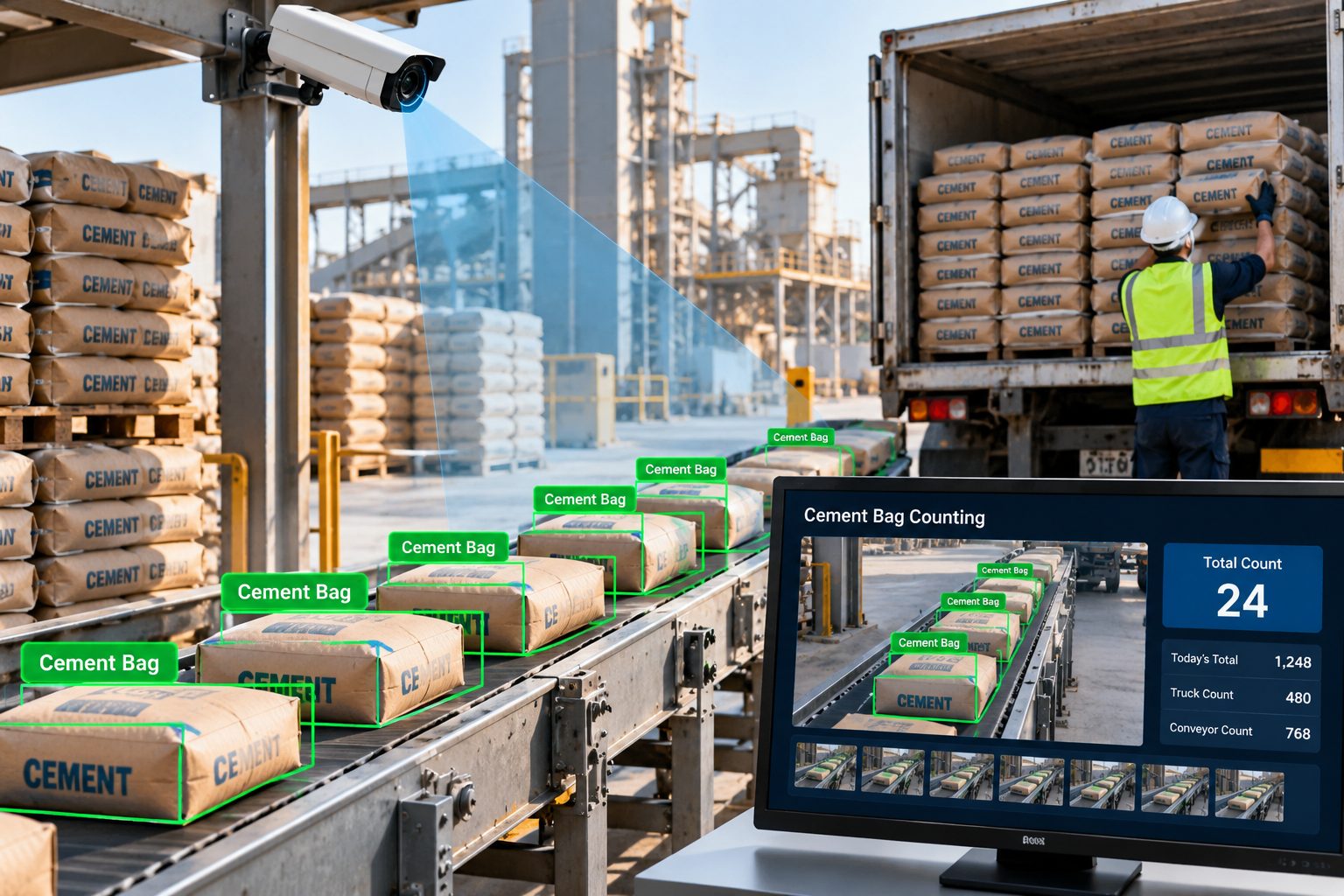
Automated cement bag counting using computer vision offers a practical way to improve these processes. By combining industrial cameras, AI-based object detection, and object tracking algorithms, businesses can automatically identify and count cement bags as they move through production and dispatch areas.
The system can capture counting events, maintain digital records, display operational information on a dashboard, and integrate with existing inventory or enterprise resource planning (ERP) systems.
What Is Automated Cement Bag Counting?
Automated cement bag counting is a computer vision application that detects cement bags in images or video streams and calculates their quantity without requiring an employee to count every bag manually.
The system uses cameras installed at selected locations, such as conveyor belts, packing lines, warehouse transfer points, or dispatch gates. Computer vision software analyzes the captured video and identifies cement bags according to a trained or configured detection model.
Depending on the operational requirements, the system may count bags individually, track their movement through a defined area, or record the number of bags passing a virtual counting line.
For example, when 50 cement bags move through a monitored conveyor section, the system can detect each bag and update the count as the bags cross the designated counting line.
A well-designed solution must account for overlapping bags, changing conveyor speeds, lighting variations, and bags that remain partially hidden from the camera.
Automated counting can help reduce manual effort, but its reliability depends on camera positioning, visual conditions, model performance, and the counting logic used.
Why Cement Manufacturers Need Automated Bag Counting
Cement production and distribution operations involve several challenges that can affect counting accuracy and operational efficiency.
1. Errors in Manual Counting
Workers may need to count hundreds or thousands of bags during production, storage transfers, and vehicle loading.
Manual counting can become difficult during busy shifts, particularly when bags move continuously or several employees handle different parts of the process.
Automated counting can help create consistent digital records and reduce repetitive counting work.
2. High-Speed Conveyor Operations
Cement bags may travel along conveyor belts at different speeds. When production output increases, employees may find it harder to count every bag accurately.
Computer vision systems can analyze video frames and track detected bags as they move through a designated counting area.
The required processing speed depends on conveyor velocity, bag spacing, camera frame rate, and the number of bags visible at once.
3. Inventory Mismatches
Differences between recorded production quantities, warehouse stock, and dispatched quantities can create reconciliation problems.
For example, production records may show 5,000 bags completed while the warehouse system records a different quantity after internal transfers.
Automated counting at selected checkpoints can provide additional records to help identify where discrepancies may have occurred.
4. Dispatch Verification Challenges
During loading, cement bags are transferred from warehouses or loading platforms into trucks.
Without a reliable counting process, dispatch teams may need to perform additional manual checks to confirm that the loaded quantity matches the order or delivery challan.
A camera-based counting system can provide an independent count for comparison with dispatch records.
5. Limited Real-Time Visibility
When counting records are updated manually, supervisors may not have immediate access to production or dispatch quantities.
An automated system can display current counts, completed batches, and potential discrepancies on a centralized dashboard, subject to the system's integration and connectivity.
How Computer Vision Counts Cement Bags Automatically
An automated cement bag counting solution typically combines industrial cameras, AI object detection, object tracking, counting rules, and a dashboard.
Step 1: Capture Video Using Industrial Cameras
Cameras are installed at suitable positions along conveyor belts, packaging lines, warehouse transfer points, or dispatch areas.
The camera placement should provide a clear view of the bags and minimize visual obstructions.
Important considerations include:
Camera height and viewing angle
Conveyor speed and bag spacing
Lighting and shadows
Dust and environmental conditions
Camera resolution and frame rate
Availability of power and network connectivity
For dusty industrial environments, suitable protective housings and regular camera maintenance may be necessary.
Step 2: Detect Cement Bags Using AI
The captured video is processed by a computer vision model trained or configured to recognize cement bags.
Object detection models, such as YOLO, can identify bag locations within video frames and return bounding boxes with confidence scores.
The system can then distinguish detected bags from other objects, such as conveyor components, pallets, workers, or nearby equipment, depending on the model's training and configuration.
Detection performance should be tested using actual factory footage because bag appearance, printing, orientation, lighting, and background conditions can vary.
Step 3: Track Bags Across Video Frames
A single cement bag may appear in many consecutive video frames. Counting every detection would cause the same bag to be counted repeatedly.
Object tracking helps associate detections across frames so that each visible bag can maintain a track while moving through the monitored area.
Algorithms such as ByteTrack can support this process by matching detections across consecutive frames.
The tracking system can estimate the movement of each detected bag and determine when it crosses a defined counting boundary.
Step 4: Count Bags at a Virtual Line
A virtual line is configured across a suitable section of the conveyor or loading area.
When a tracked bag crosses this line in the intended direction, the application records a counting event.
For example:
Bags moving toward packaging output increase the production count.
Bags moving into a loading zone increase the dispatch count.
Bags moving in the opposite direction can be handled separately when the workflow requires it.
The application should prevent repeated counts if the same bag remains near the line, changes direction, or becomes temporarily obscured.
Step 5: Apply Counting Validation Rules
The system checks counting events against predefined rules.
Depending on the workflow, these rules may identify:
Repeated counting events
Bags moving in the wrong direction
Unexpected interruptions in conveyor movement
Unusually low or high production counts
Differences between expected and observed quantities
If the visual conditions are too poor for reliable counting, the system can flag the affected period for review rather than presenting an uncertain count as definitive.
Step 6: Display Counts on a Dashboard
The application sends counting events to a dashboard where authorized users can view operational information.
A dashboard may display:
Total bags counted
Current batch quantity
Production output by shift
Dispatch quantity by vehicle
Counting timestamps
Camera or conveyor location
Exceptions requiring verification
Historical counting reports
This helps production supervisors and dispatch teams review quantities without depending entirely on manual registers.
Step 7: Integrate With ERP and Inventory Systems
The computer vision application can connect with existing ERP, warehouse management, or dispatch systems through APIs or other supported integration methods.
For example, the system may compare the camera-generated dispatch count with the quantity recorded on a delivery challan.
If the quantities differ, the application can notify an authorized employee to investigate before the dispatch is finalized.
The AI count should be treated as an operational verification input, with appropriate approval and reconciliation procedures.
Key Applications of Automated Cement Bag Counting
1. Cement Production Line Monitoring
Cement bags move from filling and packaging stations onto conveyor belts for subsequent handling.
Computer vision can count bags passing a monitored point and provide production output data for a defined time period or shift.
Supervisors can compare the recorded quantity with production targets and identify periods when output changes unexpectedly.
This is particularly useful when multiple packaging lines operate simultaneously.
2. Conveyor Belt Counting
Conveyor belt counting is one of the most direct applications of computer vision in cement manufacturing.
A camera monitors the conveyor while an AI model detects and tracks bags moving through the scene.
A virtual counting line records each bag crossing in the required direction.
For conveyors with closely spaced or overlapping bags, the solution may require a higher camera frame rate, improved viewing angles, multiple cameras, or specialized counting logic.
3. Warehouse Inventory Verification
Cement bags are often transferred between production areas, storage locations, and loading zones.
Computer vision can count bags passing selected transfer points and maintain records of those movements.
When combined with warehouse transaction data, these counts can help teams compare expected stock movement with observed activity.
However, camera-based counting at a single checkpoint does not automatically establish the total warehouse inventory. Reliable stock reconciliation may require additional checkpoints, opening balances, recorded movements, and physical stock verification.
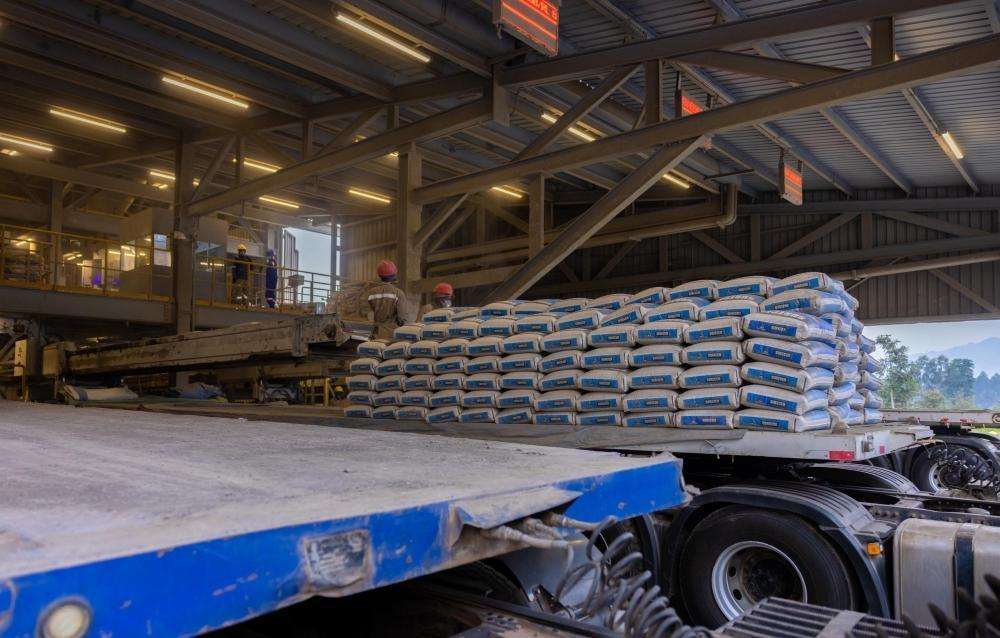
4. Truck Loading and Dispatch Verification
Dispatch operations require accurate records of the quantity loaded into each vehicle.
A camera positioned at a suitable loading point can count bags as they move toward a truck or pass through a monitored loading area.
The application can associate the count with a dispatch reference, loading session, or vehicle record when the workflow provides a reliable way to identify that session.
For example, if a dispatch order specifies 400 bags and the camera system records 397 bags crossing the counting line, the application can flag the difference for review.
This provides an additional verification step before dispatch confirmation.
5. Production and Dispatch Reconciliation
Manufacturers may want to compare quantities recorded at different stages of their operations.
Computer vision can provide counts from production output, warehouse transfers, and dispatch checkpoints.
These records can be compared to identify unexplained differences, subject to timing, stock movement, and process definitions.
For example, a difference between the production count and dispatch count may be expected when some bags remain in storage. The system should account for such operational factors rather than treating every difference as an error.
6. Multi-Line Production Monitoring
Large manufacturing facilities may have multiple bagging lines operating at the same time.
A centralized dashboard can combine counting events from multiple camera locations and display output by production line, shift, or time period.
This helps managers compare line performance and investigate unusual variations.
7. Digital Production and Dispatch Reporting
Automated counting creates structured records that can be used for operational reports.
Depending on the system design, reports can include total counts, shift summaries, dispatch references, exception logs, and timestamps.
Digital records can reduce dependence on handwritten registers and simplify reconciliation between departments.
Technologies Used in AI-Based Cement Bag Counting
A reliable system combines several computer vision and software technologies.
Computer Vision
Computer vision processes images and video to identify objects and analyze their movement.
In cement bag counting, it provides the visual analysis needed to detect bags and determine when they cross a monitored area.
Object Detection Models
Object detection models locate cement bags within each video frame.
YOLO is one possible model family for real-time object detection. The most suitable model depends on bag appearance, processing speed, hardware availability, and accuracy requirements.
Object Tracking Algorithms
Object tracking helps associate detections across consecutive frames.
ByteTrack and similar tracking approaches can support counting logic by maintaining object identities within a video sequence.
Tracking can become less reliable when bags overlap heavily or disappear from view, so the application must be tested under actual operating conditions.
Image Processing
Image processing can help prepare video frames, improve contrast where appropriate, and define regions of interest.
It can also support camera calibration and visual monitoring of the counting area.
Edge AI and Industrial Computing
Edge computing allows video processing to run near the camera, on an industrial PC or suitable edge device.
This can reduce the need to transmit continuous high-resolution video to a remote server and may provide lower-latency counting results.
The device must be selected according to the number of cameras, video resolution, model complexity, and expected processing rate.
Backend and Database Systems
A backend application stores counting events, batch information, timestamps, camera references, and reconciliation results.
A database allows authorized users to review historical records and generate reports.
The architecture should include duplicate-event protection and recovery procedures for temporary network interruptions.
ERP and Warehouse Integration
APIs can connect counting data with ERP, inventory, warehouse management, and dispatch applications.
This allows camera-based counts to support existing business workflows rather than creating a separate information system that employees must maintain manually.
Benefits of Automated Cement Bag Counting
Improved Counting Consistency
Computer vision provides a repeatable counting method that can reduce reliance on manual observation.
The actual accuracy depends on camera placement, model performance, bag visibility, and the handling of tracking errors.
Reduced Manual Work
Employees can spend less time manually counting bags at monitored checkpoints and more time supervising operations, handling exceptions, and managing production activities.
Better Dispatch Verification
Automated counts can be compared with dispatch orders to identify potential quantity mismatches before the relevant transaction is finalized.
Improved Inventory Visibility
Digital counting events help create a more detailed record of bag movement through selected production and logistics checkpoints.
When integrated with inventory systems, these records can support stock reconciliation and discrepancy investigation.
Faster Operational Reporting
Automated event records can provide near-real-time information about production output and dispatch activity, reducing the delay associated with manual reporting.
Better Traceability
Timestamps, camera locations, batch references, and dispatch identifiers can help employees investigate when and where counting discrepancies occurred.
Support for Scalable Operations
A centralized solution can be expanded to additional cameras and production lines as operational needs grow, provided the computing infrastructure and software architecture can support the increased workload.
Challenges in Cement Bag Counting and How to Address Them
Overlapping Bags
When bags overlap or stack on top of one another, the camera may not see every bag clearly.
Recommended approach: Improve camera positioning, use additional viewpoints where necessary, and train and test the detection model on representative images of overlapping bags.
High Conveyor Speed
Rapidly moving bags may appear in only a small number of video frames, increasing the difficulty of detection and tracking.
Recommended approach: Evaluate frame rate, shutter speed, image resolution, processing latency, and tracking logic using the actual conveyor speed.
Dust and Poor Lighting
Dust, shadows, glare, and inconsistent lighting can reduce image quality.
Recommended approach: Use appropriate industrial lighting, protective camera housings, suitable camera placement, and regular cleaning and maintenance.
Double Counting
A bag may be detected in multiple frames or cross a counting boundary more than once.
Recommended approach: Use object tracking, directional line-crossing logic, track-state management, and duplicate-event prevention.
Missed Detections
The model may fail to identify a bag because of occlusion, unusual positioning, or visual differences.
Recommended approach: Collect representative footage, evaluate performance under different conditions, improve training data where appropriate, and define a review process for uncertain events.
Network and Hardware Limitations
Multiple camera streams can require significant processing resources and network bandwidth.
Recommended approach: Assess the required throughput, choose appropriate edge or server hardware, and plan for temporary connectivity failures.
Integration With Existing Systems
ERP or inventory platforms may use different data structures and transaction workflows.
Recommended approach: Define data mappings, dispatch identifiers, event timestamps, retry logic, and reconciliation rules before integration.
How to Implement an Automated Cement Bag Counting System
A phased implementation helps manufacturers evaluate feasibility and performance before expanding the solution.
Step 1: Define the Business Requirement
Identify where automated counting will deliver the most value.
Possible starting points include a single production conveyor, a warehouse transfer point, or a truck loading station.
Define the required counting direction, output format, reporting frequency, and how discrepancies will be handled.
Step 2: Conduct a Site Assessment
Evaluate conveyor dimensions, bag movement, lighting, camera mounting options, dust exposure, network connectivity, and available computing infrastructure.
The site assessment should identify locations where bags can be seen clearly enough for reliable detection.
Step 3: Collect Representative Video Data
Capture sample footage during normal operation, including different conveyor speeds, lighting conditions, bag orientations, and levels of overlap.
The data should represent the actual production environment rather than only ideal conditions.
Step 4: Develop and Evaluate the AI Model
Train or configure the object detection model to recognize cement bags.
Evaluate detection precision, recall, counting error, processing latency, and performance during difficult operating conditions.
Testing should use manually verified reference counts so that the system's results can be measured objectively.
Step 5: Develop Tracking and Counting Logic
Configure object tracking and virtual line-crossing rules.
Define how the system handles bags that reverse direction, stop near the counting line, overlap, or temporarily disappear from view.
Include mechanisms to avoid duplicate counting events.
Step 6: Build the Dashboard and Reporting Module
Develop a dashboard showing the total count, current batch, production line, time period, and relevant exceptions.
Include historical reporting and the ability to investigate counting discrepancies.
Step 7: Integrate With Business Systems
Connect the application to the appropriate ERP, inventory, or dispatch system if required.
Define how the system associates counts with batches, production shifts, orders, and vehicle loading sessions.
Ensure that network failures or integration errors do not silently create incomplete or duplicate business records.
Step 8: Conduct a Controlled Pilot
Deploy the system at a selected conveyor or loading point.
Compare the AI-generated counts against verified manual counts across representative operating conditions.
Document errors, refine the model and counting rules, and confirm that the solution meets the agreed acceptance criteria.
Step 9: Deploy and Monitor
Expand the solution after the pilot demonstrates acceptable performance.
Monitor camera health, counting accuracy, processing latency, event delivery, and integration reliability.
Continue reviewing errors and recalibrating the system when operating conditions change.
Measuring the Performance of an AI Bag Counting System
Before deploying a solution across a production facility, manufacturers should establish measurable performance criteria.
Useful indicators include:
Counting error: The difference between the AI-generated count and the verified reference count.
Detection precision: The proportion of positive detections that are correct.
Detection recall: The proportion of actual target objects successfully detected.
Processing latency: The time taken to process video and produce a counting event.
System availability: The proportion of the intended operating period during which the solution functions correctly.
Exception rate: The proportion of events or operating periods requiring manual verification.
Reconciliation discrepancy rate: The frequency of differences between camera-generated counts and relevant business records.
For example, if the reference count is 1,000 bags and the system counts 990, the absolute counting error is 10 bags, or 1% of the reference count.
Counting error should be evaluated across multiple operating conditions, not just a single demonstration. Acceptance thresholds should reflect the manufacturer's operational requirements and the consequences of an incorrect count.
Real-World Example: Automated Cement Bag Counting at a Dispatch Facility
Consider a cement manufacturer that wants to improve counting accuracy during truck loading.
The company installs an industrial camera overlooking a conveyor that transports cement bags toward the loading area.
A computer vision application detects the bags, tracks their movement, and records each bag as it crosses a virtual counting line.
The dispatch operator selects the relevant dispatch order in the application. The system compares the observed count with the expected quantity and displays the result on a dashboard.
If the order requires 500 bags but the camera records 496, the system flags the difference for verification. The operator can review the loading process and confirm whether bags were missed, diverted, or counted under another transaction.
Once the discrepancy is resolved, the authorized employee can complete the dispatch verification process.
This workflow provides an additional layer of operational control and creates digital counting records for later reconciliation. It is an illustrative implementation scenario, not a claim of a verified customer result.
Future of Computer Vision in Cement Manufacturing
Computer vision is becoming increasingly relevant to industrial operations that require reliable visual inspection, counting, and tracking.
Future systems may combine bag counting with packaging inspection, barcode or label reading, vehicle monitoring, and loading verification.
For example, a connected solution could count cement bags on a conveyor, associate the count with a dispatch order, and compare the quantity against the shipment record.
Edge AI may enable more processing to occur near the production line, while integration with ERP and warehouse systems can make the resulting information available to supervisors and managers.
These capabilities can support more connected manufacturing workflows, although each application requires suitable cameras, validated models, and well-defined business rules.
Conclusion
Automated cement bag counting using computer vision can help manufacturers improve counting consistency, reduce repetitive manual work, strengthen dispatch verification, and maintain more useful digital records.
By combining industrial cameras, object detection, tracking algorithms, virtual counting lines, and business system integration, organizations can automate counting at selected production, warehouse, and loading checkpoints.
Successful implementation depends on more than selecting an AI model. Camera placement, lighting, conveyor speed, overlapping bags, counting logic, and integration reliability all influence the final result.
Manufacturers should begin with a clearly defined use case, test the solution against verified reference counts, and expand deployment only after the system meets agreed performance requirements.
The Unique IT Solution develops AI/ML and computer vision solutions for industrial automation, object detection, video analytics, and operational monitoring. Businesses exploring automated cement bag counting can evaluate a tailored approach based on their production environment, existing systems, and inventory management requirements.
Frequently Asked Questions (FAQs)
1. What is automated cement bag counting using computer vision?
It is a system that uses cameras and AI-based object detection to identify cement bags in video streams and count them as they move through a designated area.
2. How does AI count cement bags on a conveyor belt?
An object detection model identifies cement bags in video frames, while a tracking algorithm associates detections across frames. A counting rule records each tracked bag when it crosses a virtual line.
3. Can computer vision count cement bags in real time?
Yes, when the cameras, model, hardware, and counting logic are designed to meet the required processing speed. Actual performance depends on conveyor velocity, bag spacing, occlusion, and video quality.
4. Which technologies are used for automated cement bag counting?
Common technologies include YOLO-based object detection, object tracking algorithms such as ByteTrack, image processing, industrial cameras, edge computing, backend software, and dashboard integration.
5. Can AI count overlapping cement bags?
Computer vision can count some partially overlapping bags, but heavily occluded or stacked bags are more challenging. Camera placement, additional viewpoints, representative training data, and specialized counting logic may be required.
6. Can automated bag counting integrate with an ERP system?
Yes. The application can send counting records to an ERP, warehouse management, or dispatch system through APIs or other supported integration methods.