
Introduction
Businesses process large volumes of documents every day, including invoices, purchase orders, contracts, bank statements, insurance forms, delivery notes, application forms, and customer records.
Extracting information from these documents manually can be time-consuming. Employees may need to review each file, identify relevant fields, enter data into business applications, and verify the results. As document volumes increase, manual processing can create delays, inconsistencies, and additional operational work.
Optical Character Recognition (OCR) has helped businesses convert scanned documents and images into machine-readable text. However, recognizing text is only one part of document automation. Businesses often need to identify document types, understand the relationships between fields, validate extracted information, and transfer approved data into existing systems.
This is where Intelligent Document Processing (IDP) and AI-based data extraction become useful.
What Is Intelligent Document Processing?
Intelligent Document Processing is a technology approach that automates the capture, classification, extraction, and validation of information from digital and scanned documents.
An IDP solution can combine several technologies to process both structured and unstructured documents.
These may include:
OCR: Converts text contained in images and scanned documents into machine-readable text.
Document classification: Identifies the type of document being processed.
Machine learning: Recognizes patterns and supports extraction or classification tasks.
Natural language processing: Helps interpret text and identify relevant information.
AI-based data extraction: Identifies important fields and values within documents.
Business rules: Validates extracted values against predefined requirements.
Human review: Allows employees to verify uncertain or exceptional results.
System integration: Transfers approved information into ERP, CRM, accounting, or document management applications.
For example, an invoice processing system may receive a PDF, identify it as an invoice, extract the invoice number and total amount, validate the vendor details, and send the information to an accounting system for approval.
The objective is to reduce repetitive manual work while maintaining the accuracy, traceability, and control required for business operations.
What Is OCR?
Optical Character Recognition, commonly known as OCR, is a technology that converts text in images into machine-readable text.
OCR can process scanned paper documents, photographs, image-based PDFs, and other supported image formats.
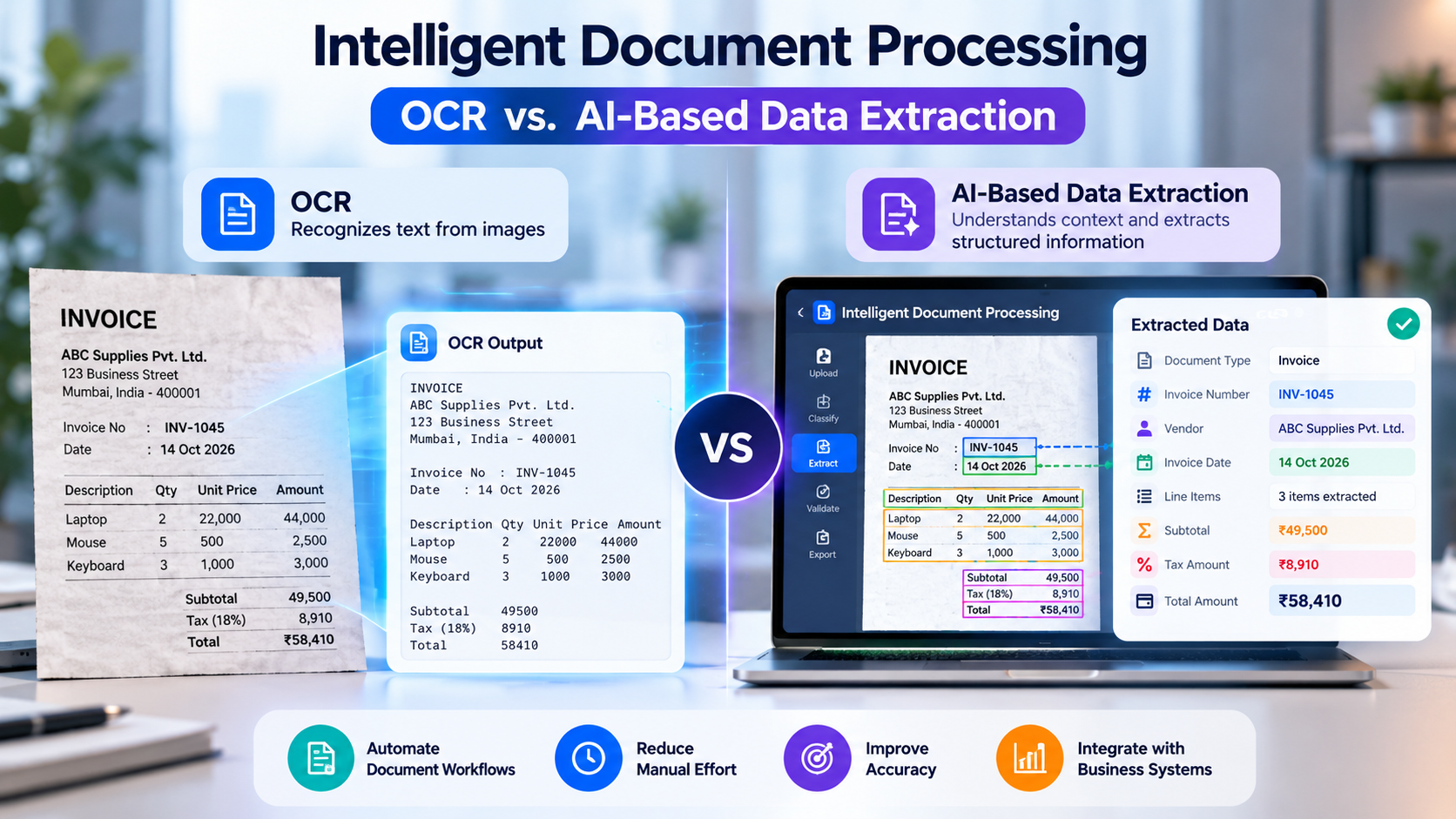
For example, consider a scanned invoice containing the following information:
Invoice Number: INV-1045
Vendor: ABC Supplies
Invoice Date: 14 October 2026
Total Amount: ₹25,000
An OCR engine can recognize these characters and produce machine-readable text.
However, basic OCR does not necessarily understand that INV-1045 is the invoice number, that 14 October 2026 is the invoice date, or that ₹25,000 represents the final amount payable.
Those values must be interpreted using additional extraction logic, document layout information, machine learning, or other processing techniques.
How Traditional OCR Works
A typical OCR workflow includes the following steps:
Document input: Receive a scanned image, photograph, or PDF.
Image preprocessing: Improve image quality, correct orientation, and reduce noise where possible.
Text recognition: Detect and recognize printed or supported handwritten characters.
Text output: Return machine-readable text, sometimes with coordinates or confidence information.
Downstream processing: Use rules, templates, or additional software to identify the required fields.
Traditional OCR is particularly useful when the main requirement is to convert image-based text into a digital format.
Its effectiveness depends on factors such as image quality, language, document layout, font, handwriting, and the OCR engine being used.
What Is AI-Based Data Extraction?
AI-based data extraction uses machine learning, language models, document understanding models, or other AI techniques to identify and extract meaningful information from documents.
Instead of stopping at character recognition, the system attempts to determine which information is relevant and how it relates to the business task.
For example, an AI-based invoice extraction system may identify:
Invoice number
Invoice date
Vendor name
Tax identification number
Purchase order number
Line-item descriptions
Quantities
Unit prices
Tax amounts
Subtotal
Total payable amount
The system can use document layout, surrounding text, field relationships, and contextual information to determine which values belong to which fields.
Depending on the solution, AI-based extraction can work with digital text, OCR output, document images, tables, and multiple document layouts.
However, AI extraction is not automatically accurate. Results should be validated, particularly when documents contain ambiguous values, unusual layouts, poor-quality scans, or information that affects financial or regulatory decisions.
OCR vs. AI-Based Data Extraction: Key Differences
OCR and AI-based extraction are related, but they solve different problems. OCR focuses primarily on recognizing text, while AI-based extraction focuses on identifying relevant information and its meaning within a document.
Comparison Factor | Traditional OCR | AI-Based Data Extraction |
Primary purpose | Convert image text into machine-readable text | Identify and extract relevant business information |
Text recognition | Core capability | May use OCR or built-in document recognition |
Field identification | Often requires rules or templates | Can identify fields using learned patterns and context |
Document layouts | May need layout-specific configuration | Can support varying layouts, depending on the model |
Context understanding | Limited by itself | Can interpret relationships between text and fields |
Table extraction | Depends on OCR and layout capabilities | Can use document structure and AI to interpret tables |
Document classification | Requires additional logic or tools | Can be included as part of the AI workflow |
Validation | Usually handled by separate rules | Can combine model outputs with rules and validation |
Human review | May be required for recognition errors | Useful for uncertain or high-impact extraction results |
Best suited for | Digitizing text and predictable document formats | Extracting structured data from varied business documents |
The distinction is important: modern OCR products may already include layout analysis, table recognition, and machine learning. Similarly, AI-based extraction systems often use OCR internally.
The comparison is therefore between basic text recognition and a broader document-understanding workflow, rather than two technologies that must always operate separately.
How Intelligent Document Processing Works
An intelligent document processing solution typically follows a sequence of steps to transform incoming documents into validated business data.
Step 1: Document Collection
Documents enter the system through approved channels such as email, file uploads, document repositories, shared folders, or business application integrations.
Examples include supplier invoices, purchase orders, contracts, customer applications, and delivery notes.
Step 2: Image Processing and Text Recognition
The system checks the document format and prepares the content for processing.
Scanned documents may require image preprocessing and OCR, while digitally generated PDFs may provide text that can be extracted directly.
Step 3: Document Classification
The system determines the document type, such as an invoice, purchase order, bank statement, delivery note, or contract.
Classification helps the workflow select the appropriate extraction model and validation rules.
Step 4: Data Extraction
The extraction component identifies the required fields, values, and relationships.
For an invoice, this could include the invoice number, vendor, date, line items, tax details, and total amount.
Step 5: Validation and Confidence Assessment
Extracted values are checked using business rules and, where appropriate, confidence thresholds.
For example, the system may verify that the invoice total is consistent with the subtotal and tax, check whether a vendor exists in the ERP system, or flag a missing purchase order number.
A model confidence score is not a guarantee of correctness. Validation should consider both the score and the consequences of an incorrect value.
Step 6: Human Review
Documents with uncertain values, missing information, conflicting fields, or failed validation checks are routed to an authorized employee.
The reviewer can correct the information and approve it for further processing.
Step 7: Business System Integration
Validated information is transferred to the relevant system, such as an ERP, CRM, accounting platform, or document management application.
The workflow can also retain processing status, source references, corrections, and audit information.
This approach creates a controlled document processing pipeline instead of treating text extraction as the final result.
Real-World Business Use Cases
Intelligent document processing can support many business functions where information must be collected from documents and entered into structured systems.
1. Automated Invoice Processing
Finance teams receive invoices from different vendors, often using different layouts and formats.
An IDP system can extract invoice details, identify vendors, capture line items, validate totals, and prepare the information for accounts payable processing.
Potential benefits:
Reduced manual data entry
More consistent invoice records
Faster exception identification
Improved visibility into invoice processing status
Payment approval and release should remain subject to the organization's financial controls.
2. Purchase Order Processing
Purchase orders contain information about products, quantities, prices, delivery dates, and suppliers.
AI-based extraction can convert purchase order documents into structured records and compare them with relevant vendor or ERP information.
This can help procurement teams identify missing fields and discrepancies before the order proceeds.
3. Contract Analysis
Contracts may contain dates, payment terms, renewal clauses, obligations, and other important information.
Document AI can help locate and organize selected clauses, extract key dates, and summarize relevant sections for review.
Because contractual interpretation can have significant legal consequences, extracted information and generated summaries should be checked by qualified personnel.
4. Banking and Financial Document Processing
Banks and financial service providers process applications, statements, identity documents, and supporting financial records.
IDP can help extract relevant fields, classify documents, and identify missing information.
Sensitive financial data requires appropriate access controls, secure processing, retention policies, and compliance review.
5. Healthcare Document Processing
Healthcare organizations handle referral letters, laboratory reports, discharge summaries, medical forms, and insurance documentation.
Document processing solutions can help classify records, extract selected fields, and route information to the appropriate workflow.
Clinical information should be validated according to its intended use, and automated extraction must not silently introduce unsupported details into patient records.
6. Logistics and Supply Chain Documentation
Logistics operations depend on documents such as invoices, delivery notes, bills of lading, purchase orders, and goods receipt notes.
AI-based extraction can capture shipment numbers, vehicle details, material descriptions, quantities, dates, and destinations.
The extracted data can then be compared with shipment or inventory records to identify potential mismatches.
7. Customer Onboarding and KYC Documentation
Businesses may need to collect and review customer applications, identity documents, proof of address, and other supporting records.
IDP can assist with document classification, field extraction, completeness checks, and routing for review.
Identity verification and compliance decisions require suitable verification methods and controls; extracting text alone does not establish that a document is authentic.
Traditional OCR vs. Intelligent Document Processing: Example
Consider a business that receives 1,000 supplier invoices each month from different vendors.
With Traditional OCR
The system recognizes the text in each invoice. Additional rules or templates may be needed to identify the invoice number, date, vendor, and amount.
If layouts vary significantly, maintaining these rules can become difficult.
With Intelligent Document Processing
The system classifies incoming documents, extracts the required fields, applies validation rules, and routes uncertain results for human review.
Validated data can then be transferred to the accounting system.
The level of automation depends on document quality, layout variation, extraction performance, integration requirements, and exception rates.
Important: IDP does not guarantee fully automated processing. Some documents will still require manual review, and the business should measure performance using its own representative documents.
Technologies Used in Intelligent Document Processing
An IDP solution may combine several technologies depending on the types of documents and the required level of automation.
Technology | Role |
OCR Engines | Recognize text from scanned documents and images |
Machine Learning | Support classification, extraction, and document understanding |
Natural Language Processing | Identify entities and interpret textual information |
Computer Vision | Analyze document layout, visual structure, and image regions |
Large Language Models | Extract or summarize information from supported document content |
Document AI Models | Understand fields, forms, tables, and document structure |
Validation Rules | Check values, relationships, and business requirements |
REST APIs | Connect extraction workflows with business systems |
SQL Databases | Store structured records and processing metadata |
Workflow Engines | Route approvals, exceptions, and review tasks |
The best architecture depends on the use case. A stable, predictable form may be handled efficiently using OCR and rules, while varied documents may benefit from AI-based extraction and document understanding.
A hybrid approach is often appropriate because it combines text recognition, AI interpretation, deterministic validation, and human review.
How to Choose Between OCR and AI-Based Data Extraction
The right choice depends on document complexity, business objectives, data quality, and the cost of processing errors.
Choose Traditional OCR When:
The primary requirement is converting scanned text into digital text.
Documents follow a consistent layout.
The number of fields to extract is small and predictable.
Existing templates or rules can reliably identify the required values.
The workflow does not require extensive contextual interpretation.
Choose AI-Based Data Extraction When:
Documents come from many sources with different layouts.
The system must identify specific fields and relationships.
Tables and line items require contextual interpretation.
Document classification is part of the workflow.
Information needs to be validated against other business records.
Processing requires a combination of extraction, classification, and workflow automation.
Choose a Hybrid IDP Approach When:
OCR is needed to recognize text in scanned documents.
AI is needed to interpret fields or handle layout variations.
Business rules are needed to validate critical values.
Human review is required for exceptions.
Validated data must be transferred into enterprise systems.
For many business workflows, the hybrid approach provides a practical balance between flexibility, control, and operational reliability.
Challenges in Intelligent Document Processing
Although IDP can reduce manual effort, implementation requires careful planning.
1. Poor Document Quality
Blurry scans, skewed pages, handwritten content, stamps, and overlapping text can reduce extraction quality.
Approach: Improve image preprocessing, define minimum document quality requirements, and route unreadable documents for review.
2. Different Document Layouts
Suppliers, customers, and departments may use different document formats.
Approach: Test across representative document types and select models or extraction strategies suitable for the expected variation.
3. Incorrect Field Extraction
A system may confuse invoice dates, purchase order numbers, subtotals, and final amounts.
Approach: Use field-level validation, confidence thresholds, arithmetic checks, and human review for uncertain values.
4. Integration Complexity
Extracted information must often be transferred into existing ERP, CRM, accounting, or document management systems.
Approach: Define API requirements, data mappings, error handling, and reconciliation procedures before implementation.
5. Data Privacy and Security
Documents may contain personal, financial, contractual, or medical information.
Approach: Apply access controls, encryption, data minimization, appropriate retention policies, and secure integration practices.
6. Monitoring and Maintenance
Document formats, business rules, and data sources may change over time.
Approach: Monitor extraction accuracy, exception rates, processing failures, and user corrections. Update models and rules when evidence shows they need improvement.
How to Implement an Intelligent Document Processing Solution
A phased approach helps organizations validate the technology before expanding it across multiple workflows.
Phase 1: Identify the Business Problem
Select a document-heavy process such as invoice processing, customer onboarding, or delivery note management.
Define the expected outputs, business rules, processing volume, and current manual effort.
Phase 2: Assess Document Samples
Collect representative documents from the intended workflow, including common formats and difficult exceptions.
Review document quality, layout variation, handwriting, tables, and missing information.
Phase 3: Define Extraction Requirements
Specify the fields to extract, required formats, validation rules, and handling of missing or conflicting values.
Phase 4: Build a Proof of Concept
Develop a limited workflow using OCR, AI extraction, or a hybrid architecture.
Test it against representative documents that were not used to configure the initial solution.
Phase 5: Measure Accuracy and Exceptions
Evaluate field-level accuracy, document classification performance, exception rates, processing time, and the amount of manual correction required.
Phase 6: Integrate With Business Systems
Connect validated output to the appropriate enterprise application through secure APIs or controlled import mechanisms.
Phase 7: Deploy and Monitor
Release the workflow with appropriate user permissions, audit trails, exception handling, and performance monitoring.
Expand the solution only after it meets agreed acceptance criteria.
How to Measure IDP Performance
Businesses should measure the quality of the complete document workflow rather than relying on OCR accuracy alone.
Important metrics include:
Character recognition accuracy: How accurately the system recognizes text.
Field extraction accuracy: How often required fields are extracted correctly.
Document classification accuracy: How often documents are assigned to the correct category.
Straight-through processing rate: The percentage of documents completed without manual intervention.
Exception rate: The proportion of documents requiring additional review.
Processing time: The time needed to process a document from receipt to completion.
Correction rate: How frequently employees need to correct extracted values.
Cost per document: The average cost of processing each document.
Integration success rate: The proportion of approved records successfully transferred to the target system.
These metrics should be evaluated against a representative test set and the organization's existing process. Accuracy should be measured at the field level when individual values have different business consequences.
Benefits of Intelligent Document Processing
When implemented and validated appropriately, IDP can provide several business benefits.
Reduced manual data entry: Automates repetitive extraction and transcription tasks.
Faster document handling: Helps process routine documents without manually reviewing every field.
Improved consistency: Applies standardized extraction and validation rules.
Better exception management: Directs incomplete, inconsistent, or uncertain records to the appropriate reviewer.
Improved traceability: Records extracted values, corrections, and processing status.
Enterprise integration: Transfers approved information into existing business workflows.
Scalable processing: Supports higher document volumes when infrastructure and exception-handling capacity are appropriately designed.
Actual improvements depend on document quality, extraction accuracy, processing volume, integration complexity, and the percentage of documents requiring manual intervention.
Conclusion
OCR and AI-based data extraction are important components of modern document automation, but they serve different purposes.
OCR converts text from images and scanned documents into machine-readable text. AI-based extraction goes further by identifying relevant fields, interpreting document context, and helping structure information for business use.
Intelligent Document Processing combines these capabilities with document classification, validation, workflow automation, and enterprise integration.
For predictable documents, OCR combined with templates and business rules may be sufficient. For complex documents with varying layouts and contextual requirements, AI-based extraction may offer greater flexibility. Many enterprise workflows benefit from a hybrid approach.
The most effective implementation begins with a specific business problem, representative document samples, measurable accuracy targets, and clear exception-handling procedures.
When these elements are in place, intelligent document processing can help businesses reduce repetitive work, improve information accessibility, and create more consistent document-driven workflows.
Planning an Intelligent Document Processing Solution?
Start by identifying the documents that require the most manual effort, defining the fields that must be extracted, and evaluating how validated information should flow into existing business systems. A focused proof of concept can help establish feasibility and determine the right approach for your organization.
Frequently Asked Questions
1. What is intelligent document processing?
Intelligent Document Processing combines technologies such as OCR, machine learning, document classification, AI-based extraction, and validation to convert documents into structured business information.
2. What is the difference between OCR and AI-based data extraction?
OCR primarily recognizes text in images and scanned documents. AI-based data extraction identifies meaningful fields and values using context, layout, learned patterns, or language models. Many solutions combine both.
3. Can AI extract data from PDF documents?
Yes. AI-based systems can process supported digital and scanned PDFs. Scanned documents may require OCR, while digitally generated PDFs may provide text that can be extracted directly.
4. Can intelligent document processing extract data from invoices?
Yes. An IDP solution can extract fields such as invoice numbers, dates, vendor names, tax amounts, line items, and totals, then validate the results before transferring approved data into accounting or ERP systems.
5. Is AI-based data extraction always more accurate than OCR?
No. Accuracy depends on document quality, field complexity, the selected technology, configuration, and validation. OCR may be sufficient for simple documents, while AI can help with varied layouts and contextual extraction.
6. Can IDP work with handwritten documents?
Some OCR and document AI systems support handwriting recognition, but performance varies with handwriting quality, language, and document conditions. Representative testing is necessary.
7. What is the difference between OCR and IDP?
OCR focuses on recognizing text. IDP is a broader workflow that can include OCR, classification, data extraction, validation, human review, and integration with business applications.
8. Can intelligent document processing integrate with ERP systems?
Yes. Validated data can be transferred to compatible ERP, CRM, accounting, and document management systems through APIs, connectors, or controlled import workflows.
9. Is human review still necessary in AI document processing?
It may be necessary for uncertain extractions, conflicting information, poor-quality documents, and high-impact decisions. The required level of review depends on the workflow and its risk.
10. How long does it take to implement an IDP solution?
The timeline depends on document types, extraction requirements, integration complexity, testing needs, and security controls. A focused proof of concept is generally simpler than a production deployment across multiple departments.