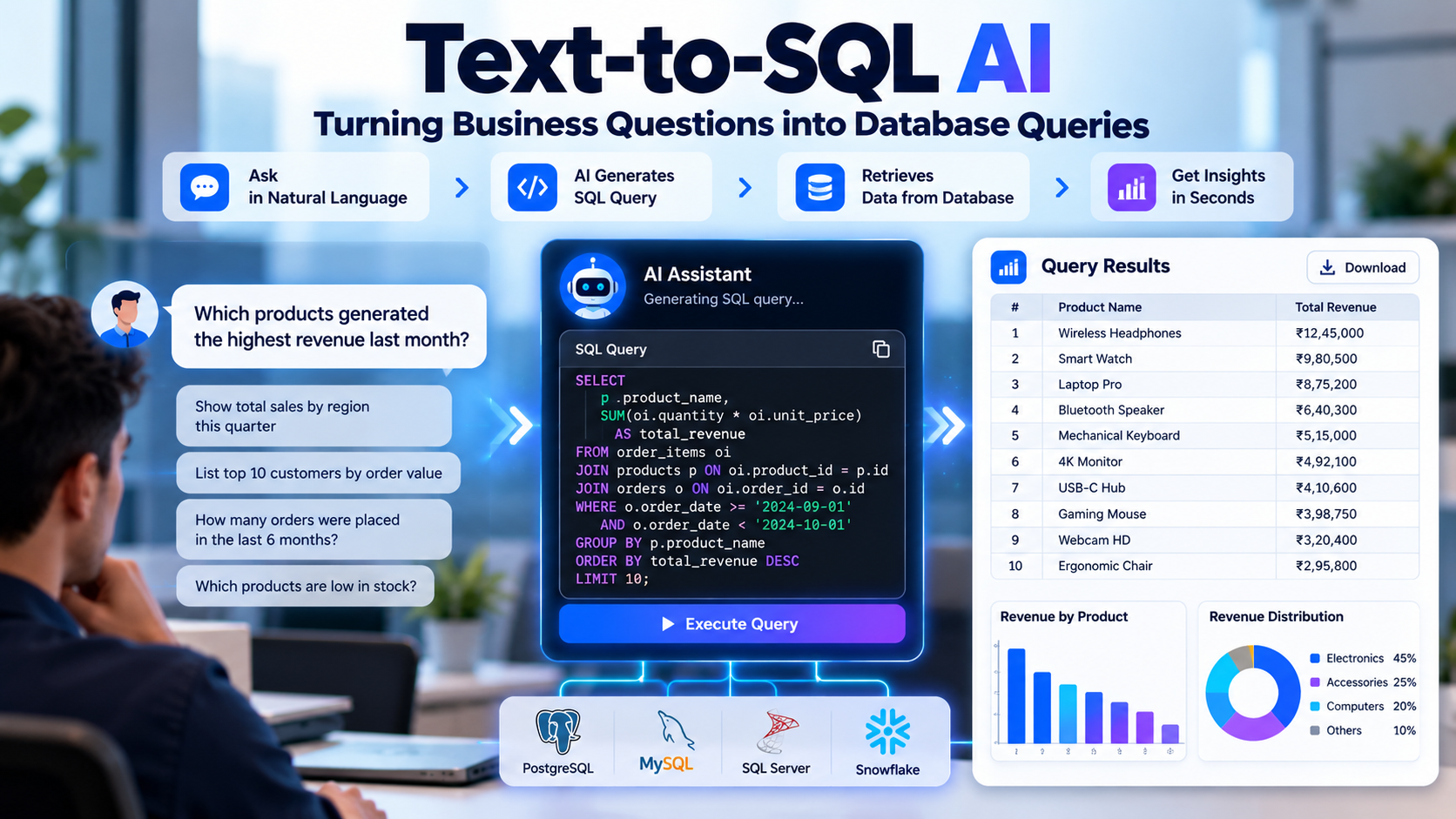

1. Introduction
Modern businesses generate large amounts of data through sales platforms, customer relationship management (CRM) systems, enterprise resource planning (ERP) software, inventory applications, financial systems, and operational databases. This data contains valuable information about revenue, customer behavior, product performance, business expenses, inventory movement, and operational efficiency.
A sales manager may want to know which products generated the highest revenue last month. A finance manager may need a list of overdue invoices. An operations manager may want to identify products that are running low in stock. Answering these questions often requires someone who understands the database structure and can write the appropriate SQL query.
This dependency can slow down routine reporting and create additional work for development and data teams.
Text-to-SQL AI provides a natural-language interface for accessing structured business data. It allows users to ask questions in everyday language and translates those questions into SQL queries that retrieve relevant information from a database.
For example, instead of writing a complex query, a business user could ask:
“Show me the top 10 products by revenue for the previous quarter.”
A Text-to-SQL system interprets the request, identifies the relevant database tables and columns, generates a query, validates it, and retrieves the results when authorized. The application can then display the information in a table, chart, or summarized report.
The technology is useful not only for generating SQL syntax but also for making data exploration more accessible to employees who do not have advanced database skills.
Nevertheless, reliable Text-to-SQL implementation requires more than connecting a language model to a database. The system must understand business terminology, identify the correct data relationships, apply the right filters, enforce access permissions, and ensure that generated queries answer the intended question.
2. What Is Text-to-SQL AI?
Text-to-SQL AI is a technology that converts natural-language questions into Structured Query Language (SQL) statements.
SQL is commonly used to retrieve, filter, aggregate, join, and analyze information stored in relational databases. Traditionally, users need to understand SQL syntax and the underlying database schema to write effective queries.
Text-to-SQL systems use artificial intelligence techniques, including large language models (LLMs), natural language processing, schema understanding, and query validation, to bridge the gap between business questions and database instructions.
For example, a user might ask:
“How many orders did each customer place this month?”
The system needs to identify several requirements:
The user wants a count of orders.
The results should be grouped by customer.
The date range should cover the current month.
The query must identify the correct relationship between customers and orders.
Only records the user is authorized to access should be included.
A simplified SQL query could look like this:
SELECT

    c.customer_name,

    COUNT(o.order_id) AS total_orders

FROM customers AS c

JOIN orders AS o

    ON c.customer_id = o.customer_id

WHERE o.order_date >= :start_date

  AND o.order_date < :end_date

GROUP BY

    c.customer_id,

    c.customer_name

ORDER BY total_orders DESC;
The parameters :start_date and :end_date are supplied by the application. The query assumes that the database contains compatible customer and order tables with the specified fields.
The generated SQL can then be validated and executed against the database. The returned records are presented to the user in a readable format.
How Text-to-SQL Differs From a Basic SQL Generator
A basic SQL generator may convert a predefined instruction into a query template. A Text-to-SQL AI system aims to interpret more flexible questions and use the available database context to generate the appropriate query.
For example, the following questions express related business requirements in different ways:
Which products sold the most last month?
Show the best-selling products for the previous month.
Rank products by the number of units sold last month.
Although the wording differs, the system should identify the intended metric, date range, and grouping. It must also distinguish between products ranked by units sold and products ranked by revenue, because those calculations can produce different results.
This ability to interpret intent makes Text-to-SQL useful for conversational analytics and self-service reporting.
3. Why Businesses Need Text-to-SQL AI
Many organizations have centralized their business information in databases but still rely on technical teams to retrieve and prepare reports.
This creates several common challenges.
3.1 Dependency on Technical Teams
Business users may need assistance even for relatively simple questions because they do not know the database schema or SQL syntax.
A Text-to-SQL interface can reduce the need to write SQL manually for supported reporting tasks. Developers and data analysts can then focus on complex analysis, data modeling, and database optimization.
3.2 Delays in Business Reporting
Managers frequently need updated information to make operational decisions. Waiting for a report to be created can delay decisions about inventory, sales, procurement, or customer follow-up.
Natural-language database querying can make routine information retrieval more direct, provided the relevant data is available and the generated query is correct.
3.3 Difficulty Exploring Data
Traditional dashboards usually provide predefined filters and reports. These are useful for standard monitoring, but users may have additional questions that are not covered by existing dashboards.
Text-to-SQL can provide a conversational way to explore supported datasets without requiring a new dashboard for every question.
3.4 Limited Access to Business Insights
Employees may understand the business problem but lack the technical skills needed to retrieve the information.
A natural-language interface can make structured data easier to access for authorized nontechnical users.
3.5 Repetitive Reporting Work
Data and development teams often receive recurring requests for sales summaries, pending invoices, stock reports, customer activity, and other routine information.
A well-designed Text-to-SQL solution can automate supported queries and reduce repetitive reporting work.
The objective is not to eliminate database expertise. It is to make routine data access more efficient while preserving expert oversight for complex, sensitive, or high-impact analysis.
4. How Text-to-SQL AI Works: Step-by-Step Process
A production-ready Text-to-SQL system generally follows a structured workflow.
Step 1: User Enters a Business Question
The process begins when a user submits a question through a web application, internal dashboard, chat interface, or analytics portal.
Example:
“Show monthly sales revenue for each region during 2026.”
The system must identify the metric, grouping, date range, and expected output.
If the user asks for “sales” without specifying whether they mean order value, recognized revenue, or units sold, the application may need to ask for clarification.
Step 2: Natural Language Understanding
The system analyzes the question to identify the requested information and the relationships between different parts of the request.
It may identify:
Metric: Sales revenue
Grouping: Region
Time period: Calendar year 2026
Output: Monthly totals
Sorting: Chronological order, if required
Natural language understanding helps translate the user's business terminology into a structured representation of the requested analysis.
Step 3: Database Schema Retrieval
The system identifies which database tables and columns are relevant to the question.
For example, a sales database might contain:
Customers
Orders
OrderItems
Products
Regions
Payments
The application needs to determine where the required information is stored and how the tables are related.
This step can use database metadata, schema descriptions, foreign-key relationships, approved query examples, and a semantic layer containing business definitions.
Providing the model with relevant schema information is generally more effective than sending the entire schema of a large enterprise database for every request.
Step 4: SQL Query Generation
The AI model generates a candidate SQL query using the user's question and the retrieved schema context.
The query may include:
SELECT statements to choose fields
WHERE conditions to filter records
JOIN operations to combine tables
GROUP BY clauses to aggregate data
Aggregate functions such as SUM, COUNT, and AVG
Date filters and sorting logic
The system must select the appropriate SQL dialect for the database, because PostgreSQL, Microsoft SQL Server, MySQL, and other platforms differ in some syntax and supported functions.
Step 5: SQL Validation and Security Checks
The generated query should not be executed immediately without validation.
The application should check whether the query is syntactically valid, references permitted tables and columns, uses allowed operations, and respects user access permissions.
Additional controls may include:
Restricting execution to read-only queries
Blocking unauthorized tables and sensitive fields
Applying query timeouts and result limits
Enforcing row-level and column-level access restrictions
Preventing multiple statements or prohibited operations
Prompt instructions alone are not sufficient to enforce database security. The application and database must apply the actual restrictions.
Step 6: Query Execution
After validation, the application executes the query using an appropriately restricted database connection.
The database processes the query and returns the matching records.
If the query fails, the system should handle the error safely. It may revise the query under controlled rules, request clarification, or return an understandable error message.
It should not repeatedly execute unrestricted model-generated queries without limits.
Step 7: Result Processing
The application receives the database results and prepares them for display.
Depending on the request, this may involve formatting dates, displaying currency, organizing rows, or calculating approved presentation-level summaries.
The system should preserve the meaning of the returned data and avoid inventing values that were not retrieved.
Step 8: Natural Language Response
The application can use the query results to generate a concise explanation.
For example:
“The North region generated the highest revenue during the selected period, followed by the West and South regions.”
Such a statement must be supported by the actual query results. If the query returns no records, the system should explain that rather than inventing an answer.
Step 9: Follow-Up Questions
A conversational interface may allow users to ask follow-up questions such as:
Break the results down by product category.
Compare the current quarter with the previous quarter.
Show only regions where revenue decreased.
The system must preserve the relevant context from the earlier question while correctly updating the requested filters and calculations.
5. Text-to-SQL AI Architecture
A Text-to-SQL application typically includes several components that work together to turn a question into a controlled database operation.
5.1 User Interface
The user interface allows employees to submit questions and view results.
It may include:
A natural-language chat input
Query history
Result tables
Charts and summaries
Generated SQL for inspection
Export options
Error messages and clarification prompts
The interface should make it clear which database or dataset is being queried and which filters were applied.
5.2 Backend Application
The backend manages the workflow between the user interface, AI model, database, and security layer.
It handles authentication, request processing, schema retrieval, query validation, database execution, and response formatting.
A backend framework such as FastAPI or ASP.NET Core can be used depending on the existing technology stack and team expertise.
5.3 Large Language Model
The LLM interprets natural-language questions and generates candidate SQL based on the available schema and business context.
The model may also help identify ambiguity or explain query results.
The model should not be treated as the authority on database permissions or business definitions. Those controls should be implemented in the application and database.
5.4 Schema and Business Context Layer
This component provides information about database tables, columns, relationships, and business terminology.
For example, the term “revenue” may refer to a different field or calculation in sales, finance, and accounting systems.
A semantic layer can define approved metrics such as gross sales, net revenue, active customers, and overdue invoices. This reduces the risk of different queries producing inconsistent interpretations of the same business term.
5.5 Query Validation Layer
The validation layer inspects generated SQL before execution.
It may use SQL parsing, allowlists, database metadata, query-plan checks, and permission rules to reject unsupported or unsafe queries.
A simple keyword filter is not enough to provide comprehensive SQL security.
5.6 Database Connector
The database connector executes approved queries and returns results.
It should use scoped credentials and appropriate connection settings. Separate database views or reporting replicas can be useful when the workload or data sensitivity requires additional isolation.
5.7 Result Presentation Layer
This component converts query results into readable tables, charts, and summaries.
It should preserve the original query filters and distinguish retrieved data from AI-generated interpretation.
Architecture Workflow
Business User
|
v
Natural-Language Question
|
v
Backend Application
|
v
Schema and Business Context
|
v
AI Model Generates SQL
|
v
SQL Validation and Permission Checks
|
v
Approved Database Query
|
v
Database Results
|
v
Table, Chart, or Natural-Language Summary
Each component has a distinct responsibility. The AI model generates a candidate query, while the application and database enforce access controls and determine whether execution is permitted.
6. Real-World Business Applications of Text-to-SQL AI
6.1 Sales and Revenue Analytics
Sales teams need regular information about revenue, product performance, customer orders, and regional sales activity.
Users may ask:
Which products generated the highest revenue last month?
What was the total sales value for each region?
Which sales representatives achieved their targets?
How many orders were placed this quarter?
Which customer segments generated the most sales?
The system can translate these questions into queries against the sales database and present the results in a structured report.
Business value: Faster access to sales information and less dependence on manual reporting for routine questions.
6.2 Finance and Accounting
Finance departments work with invoices, expenses, payments, budgets, and accounting transactions.
A Text-to-SQL interface can support questions such as:
What is the total value of overdue invoices?
How much did each department spend this month?
Which invoices are awaiting approval?
What were the monthly operating expenses?
How much was collected from customers during the previous quarter?
The application must use approved accounting definitions and restrict access to confidential financial records.
It should not independently authorize payments or modify financial records simply because a generated query suggests an action.
Business value: More convenient financial reporting and faster access to authorized accounting information.
6.3 Inventory and Warehouse Management
Inventory systems store information about products, warehouses, stock movements, suppliers, and purchase orders.
Users may ask:
Which products are below the reorder level?
What is the available stock by warehouse?
Which products have not moved in the last 90 days?
How many units were received this week?
Which items have the highest stock value?
Text-to-SQL can retrieve the relevant records and help inventory managers identify potential replenishment requirements.
The result depends on accurate stock records and a clear distinction between available, reserved, damaged, and in-transit quantities.
Business value: Faster stock reporting and easier access to operational inventory information.
6.4 Customer Relationship Management
CRM databases contain leads, customers, interactions, sales opportunities, and service records.
A business user may ask:
How many new leads were created this month?
Which opportunities are still in negotiation?
Which customers have not placed an order in six months?
How many deals were won this quarter?
Which leads have not received a follow-up?
The system can retrieve information from the appropriate CRM tables or reporting views, subject to the user's permissions.
Business value: Easier exploration of customer activity and sales pipeline information.
6.5 Human Resources Analytics
HR teams may need aggregated information about employee numbers, attendance, leave, recruitment, and workforce planning.
Example questions include:
How many employees work in each department?
How many positions remain open?
What is the monthly recruitment trend?
How many leave requests are awaiting approval?
How has headcount changed over the past year?
Because employee records can be sensitive, access should be limited to authorized users. Aggregated reports should also be designed to avoid exposing individual information unintentionally.
Business value: More accessible workforce reporting without requiring employees to construct database queries manually.
6.6 ERP Reporting
ERP platforms connect information from departments such as procurement, sales, finance, inventory, and operations.
Text-to-SQL can provide a conversational interface for questions that involve multiple ERP datasets.
For example:
“Show purchase orders that have been received but not yet invoiced.”
This may require joining purchase order, goods receipt, and invoice records. The correct query depends on the ERP's data model and the organization's definition of a received or invoiced order.
Business value: Faster cross-functional reporting when the required data is available through approved views or database access.
6.7 Project and Operations Management
Operational teams often need updates about project status, delivery performance, pending tasks, and service-level targets.
Example questions include:
Which projects are behind schedule?
How many tasks are awaiting approval?
What is the average delivery time by region?
Which jobs have exceeded their estimated cost?
How many service requests remain unresolved?
The system can retrieve information from structured project and operational databases, helping users investigate issues without manually creating each report.
Business value: Easier access to operational information and more flexible reporting.
7. Text-to-SQL AI vs. Traditional Business Intelligence
Traditional business intelligence platforms provide predefined dashboards, reports, filters, and data visualizations. Text-to-SQL introduces another method of interacting with the underlying structured data.
Capability | Traditional BI Dashboards | Text-to-SQL AI |
Primary interaction | Dashboards, filters, and reports | Natural-language questions |
Report flexibility | Depends on available dashboard features | Can generate supported queries dynamically |
SQL knowledge | Usually hidden from dashboard users | Not necessarily required for supported questions |
Standard metrics | Often defined in report models | Must be governed through semantic definitions and validation |
Ad hoc questions | May require new reports or custom analysis | Can support questions beyond predefined dashboards |
Visualization | Usually a core feature | Can be added to the query-result interface |
Governance | Depends on BI platform and data model | Requires model, application, and database controls |
These approaches can complement each other.
Dashboards remain useful for standardized reporting and consistent performance monitoring. Text-to-SQL can help users investigate additional questions that are not already answered by existing reports.
For important business metrics, both approaches should use the same approved definitions wherever possible.
8. Technologies Used in Text-to-SQL AI Development
The technology stack depends on the database platform, the complexity of questions, the required user interface, and the organization's security requirements.
Large Language Models
LLMs interpret user requests and generate candidate SQL queries based on schema information and business context.
Model selection should consider SQL-generation quality, latency, cost, privacy requirements, and support for the intended database dialect.
Python
Python is commonly used for AI orchestration, data processing, API development, and integration with model libraries.
Backend Frameworks
FastAPI, Flask, ASP.NET Core, or other backend frameworks can manage authentication, requests, query execution, and responses.
Relational Databases
PostgreSQL, Microsoft SQL Server, MySQL, and other relational databases can provide the structured data used by the system.
SQL Parsing and Validation
SQL parsing tools and database metadata can help inspect generated queries before execution. Validation should enforce a clear set of permitted operations and data-access policies.
Schema Retrieval
Schema retrieval provides the model with relevant tables, columns, relationships, descriptions, and approved examples.
For larger databases, retrieving only the relevant schema information can reduce unnecessary context and improve query generation.
Semantic Layers
A semantic layer defines business metrics and relationships in a consistent way.
For example, it can define whether “sales” means gross order value, net sales after discounts, or recognized revenue. This is particularly important when different departments use the same term differently.
Monitoring and Logging
Monitoring tools help track query failures, response latency, resource usage, and user activity. Logs must be designed carefully to avoid exposing sensitive queries or database values to unauthorized people.
9. Common Challenges in Text-to-SQL AI
9.1 Ambiguous Questions
A question such as “Show the best-performing products” does not define whether performance means revenue, profit, units sold, or growth.
Solution: Define supported business metrics and ask clarification questions when the user's intent is uncertain.
9.2 Complex Database Schemas
Enterprise databases can contain hundreds of tables, duplicated concepts, inconsistent naming conventions, and complicated relationships.
Solution: Maintain schema documentation, use schema retrieval, define approved relationships, and expose curated reporting views where possible.
9.3 Incorrect Joins and Aggregations
A query may join tables incorrectly or count duplicated records. For example, joining order headers with multiple line items can inflate totals if the aggregation is not designed correctly.
Solution: Document relationships, validate aggregation logic, and test generated queries against verified expected results.
9.4 Inconsistent Business Definitions
Different teams may use terms such as “revenue,” “active customer,” or “completed order” differently.
Solution: Establish a shared semantic layer and reuse approved definitions for important metrics.
9.5 Query Performance
Complex joins and large scans can place unnecessary load on production databases.
Solution: Use query timeouts, execution limits, indexes, reporting replicas, and query-plan evaluation as appropriate.
9.6 Sensitive Data Exposure
A query could expose personal information, financial records, or confidential business details if the database connection has excessive permissions.
Solution: Enforce least-privilege access, approved views, row-level security, and column-level restrictions.
9.7 Incorrect Natural-Language Summaries
The query results may be correct while the AI-generated explanation misstates a number or draws an unsupported conclusion.
Solution: Ground summaries in the actual result set, validate important numerical statements, and allow users to inspect the underlying data.
10. Security Best Practices for Text-to-SQL AI
A Text-to-SQL application should be designed around controlled database access.
Use Read-Only Database Credentials
For analytical use cases, use read-only database credentials wherever possible. This reduces the risk of generated queries modifying records.
Apply Least-Privilege Access
Users should only be able to access the information required for their roles. The application should enforce permissions independently of the model's instructions.
Validate Generated SQL
Parse queries and check the statement type, tables, columns, functions, and operations before execution.
Allow only the query patterns supported by the application. Do not rely solely on searching for prohibited keywords.
Protect Sensitive Columns
Fields containing personal, financial, or confidential information should be restricted based on the user's authorization.
Apply Query Limits
Set timeouts, maximum result sizes, and database resource limits to prevent runaway queries or excessive data retrieval.
Use Secure Parameter Handling
Use parameterized values where supported and avoid constructing executable SQL by concatenating untrusted user input.
Maintain Audit Trails
Record appropriate information about requests, access decisions, queries, execution outcomes, and errors. Protect logs from unauthorized access and define retention requirements.
Separate Query Generation From Execution
The AI should generate a candidate query, but a controlled application layer should determine whether the query can execute.
This separation makes it easier to enforce policies, review generated SQL, and investigate unexpected results.
11. How to Develop a Text-to-SQL AI Solution
A structured implementation process helps establish feasibility and reduce risk before deploying the solution across the organization.
Phase 1: Business Requirement Analysis
Identify the main users, business questions, data sources, and reporting problems.
Define:
Target user groups
Supported business questions
Required database tables and fields
Business metric definitions
Security and privacy requirements
Expected response time
Acceptance criteria
The initial scope should focus on a manageable set of high-value questions rather than unrestricted access to every database table.
Phase 2: Database and Data Quality Assessment
Review the database schema, relationships, naming conventions, and quality of the stored information.
Identify missing values, inconsistent status fields, duplicated records, and undocumented business logic that could affect query results.
Phase 3: Solution Architecture
Choose the language model, backend framework, database connector, schema retrieval method, query validator, and result presentation approach.
Define how authentication, permissions, logging, and error handling will work.
Phase 4: Schema and Semantic Context Setup
Prepare schema descriptions and document the meaning of important fields.
Define business metrics such as revenue, order count, overdue invoice, and available inventory. Use approved examples for recurring queries where useful.
Phase 5: AI Query Generation
Develop the workflow that converts a user question into a structured interpretation and candidate SQL query.
Include clarification handling for ambiguous requests and restrict the system to the supported SQL dialect and operations.
Phase 6: Query Validation and Execution
Implement SQL parsing, permission checks, execution limits, and safe database connectivity.
Begin testing in a development or staging environment before enabling production access.
Phase 7: Accuracy Testing
Prepare a test set containing realistic business questions and verified expected results.
Include simple queries, joins, aggregations, date filters, ambiguous questions, empty-result cases, and unauthorized access attempts.
Evaluate both SQL execution success and the correctness of the resulting business answer.
Phase 8: User Interface Development
Build the interface for submitting questions and viewing results.
Consider including:
Natural-language query input
Result tables and charts
Generated SQL preview
Applied filters and metric definitions
Query history
Export functionality
Clear error and clarification messages
Phase 9: Deployment
Deploy the application with secure credentials, appropriate permissions, monitoring, and operational ownership.
Depending on the organization's requirements, the system may run in a cloud environment, a private environment, or on-premises infrastructure.
Phase 10: Continuous Monitoring
Track failed queries, incorrect results, query latency, database resource usage, and user feedback.
Use these observations to improve schema context, business definitions, validation rules, and supported query patterns.
12. How to Measure Text-to-SQL AI Performance
A reliable evaluation process should measure both technical behavior and business correctness.
Metric | Description |
SQL Execution Success Rate | Percentage of generated queries that execute successfully |
Result Correctness | Percentage of tested questions for which the returned data matches the expected result |
Business Definition Compliance | Whether approved metrics and filters are used correctly |
Query Latency | Time taken to generate, validate, and execute a query |
Clarification Rate | Percentage of questions requiring additional information |
Security Compliance | Whether access controls prevent unauthorized queries and data retrieval |
Query Cost | Average model and database cost per request |
User Satisfaction | Whether users find the answers understandable and useful |
Execution success should not be confused with answer accuracy. A syntactically valid query can still use the wrong join, filter, date range, or metric definition.
For this reason, the evaluation process should use verified test questions and expected results, including realistic edge cases.
13. Benefits of Text-to-SQL AI for Businesses
When implemented correctly, Text-to-SQL AI can offer several operational advantages.
Faster Access to Information
Employees can retrieve supported business information through natural-language questions rather than writing SQL manually.
Reduced Repetitive Reporting Work
Routine reporting requests can be handled through a controlled self-service interface, reducing the workload associated with simple queries.
Improved Data Accessibility
Authorized users who do not have SQL expertise can explore supported structured datasets more easily.
Flexible Data Exploration
Users can refine questions, adjust filters, and request additional breakdowns through follow-up interactions.
Better Support for Business Decisions
Managers can access relevant data more directly, provided the results are accurate and the underlying business definitions are consistent.
More Productive Data Teams
Data analysts and developers can spend less time responding to some repetitive queries and more time working on data quality, advanced analytics, and complex business requirements.
These benefits depend on the quality of the data, query-generation performance, security design, and adoption by intended users. They should be measured during implementation rather than assumed.
14. Future Trends in Text-to-SQL AI
Text-to-SQL technology is developing alongside broader advances in enterprise AI and conversational analytics.
Semantic-Layer Integration
Future systems will increasingly use governed business definitions to improve consistency across departments and reporting tools.
Conversational Data Analysis
Users can explore results through follow-up questions, comparisons, and additional filters while preserving the context of the original request.
AI-Assisted Data Visualization
Applications can recommend charts and summaries based on the type of query result, helping users interpret information more easily.
Multi-Database Analytics
Systems can combine information from multiple approved databases, although cross-system analysis requires careful data modeling, permissions, and query orchestration.
Automated Query Optimization
AI-assisted workflows may help identify inefficient queries and suggest alternatives, with database execution plans and performance testing used to verify improvements.
Governed Enterprise AI
Organizations will continue to emphasize access controls, auditability, standardized metrics, monitoring, and safe execution as natural-language database interfaces become more common.
These developments can improve usability, but reliable data and well-defined business rules will remain essential.
15. Conclusion
Text-to-SQL AI is changing how businesses interact with structured data by allowing users to express information needs in natural language and translate them into database queries.
From sales and financial reporting to inventory management, CRM analytics, ERP reporting, and operational monitoring, the technology can make routine data retrieval more accessible to authorized users.
However, generating SQL is only one part of a reliable solution. The system must understand the database schema, apply consistent business definitions, validate generated queries, enforce permissions, manage database resources, and present results accurately.
The most practical approach is to start with a focused use case, establish a verified set of business questions, and evaluate the solution against measurable accuracy and security requirements.
As the system demonstrates reliable performance, organizations can expand its supported datasets and analytical capabilities.
Planning a Text-to-SQL AI Solution for Your Business?
Identify the questions your teams ask most frequently, the data sources required to answer them, and the controls needed to protect sensitive information. A focused proof of concept can help determine whether natural-language database querying is the right approach for your organization.
Frequently Asked Questions
1. What is Text-to-SQL AI?
Text-to-SQL AI converts natural-language questions into SQL queries that retrieve information from structured databases. It can help business users access data without writing SQL manually for every request.
2. How does Text-to-SQL AI convert natural language into SQL?
It interprets the question, retrieves relevant database schema information, generates a candidate query, validates the SQL, executes it under appropriate permissions, and presents the results.
3. Can nontechnical employees use Text-to-SQL AI?
Yes. It can help authorized employees ask supported business questions in everyday language. Complex, ambiguous, or sensitive questions may still require clarification or expert review.
4. Which databases support Text-to-SQL AI?
A Text-to-SQL application can be built for compatible databases such as PostgreSQL, Microsoft SQL Server, MySQL, and other relational systems. Compatibility depends on the database connector, schema, SQL dialect, and application architecture.
5. Can Text-to-SQL AI work with an ERP system?
Yes. It can retrieve authorized information from structured ERP data, such as purchase orders, inventory, invoices, and sales records, when the required data is available through suitable database views or APIs.
6. Is Text-to-SQL AI accurate?
Accuracy depends on the model, schema context, question clarity, data quality, and validation process. Testing should measure whether the query returns the correct business result, not just whether it executes successfully.
7. Is Text-to-SQL AI secure?
It can be designed securely using restricted database credentials, SQL validation, role-based access, row-level and column-level restrictions, query limits, and audit logging. Connecting an AI model directly to a database without appropriate safeguards is not recommended.
8. Can Text-to-SQL AI generate charts?
Yes. The application can convert query results into tables, charts, and natural-language summaries. Visualizations should be based on actual query results and should not misrepresent the underlying data.