
If you're planning a WhatsApp AI chatbot for customer service, the late-2025 headlines probably made you pause. Most of them said some version of "Meta bans AI chatbots on WhatsApp". For Indian D2C brands and marketplaces, where WhatsApp is often the main support queue, that sounded serious. Meta's India leadership has called WhatsApp business messaging the "next engine of growth" in the country and named customer service and order updates as growth areas (Outlook Business). Losing AI on that channel would hurt.
Here's the short answer. The rule targets general-purpose AI assistants, the ChatGPT-on-WhatsApp kind, where the AI itself is the product. Support bots that serve a real business are allowed. When Meta explained the change, it told TechCrunch that "a travel company running a bot for customer service won't be barred" (TechCrunch).
This guide covers the exact wording of the rule and what has changed since January 2026. It then turns the rule into a design checklist and walks through the architecture of a production support bot: grounding, order lookups, identity checks, scope limits and handover. After that come the pricing changes that took effect in October 2026, and how to choose between Meta's Business Agent, a messaging platform and a custom build. One idea runs through all of it: a well-built support bot and a compliant one are mostly the same thing.
What Meta's WhatsApp AI policy actually says
The clause, in plain English
The relevant text is clause 4.7 of the Meta Terms for WhatsApp Business Platform. It defines "AI Providers" as "Providers and developers of artificial intelligence or machine learning technologies, including but not limited to large language models, generative artificial intelligence platforms… as determined by Meta in its sole discretion."
It then says AI Providers "are strictly prohibited from accessing or using the WhatsApp Business Platform, whether directly or indirectly" to offer those technologies "when such technologies are the primary (rather than incidental or ancillary) functionality."
Three things follow from that wording:
- The test is about what the bot does, not what it runs on. Using an LLM is fine. Offering an LLM as the thing people come to WhatsApp for is not.
- "Directly or indirectly" closes the obvious loophole. Putting a general assistant behind a brand's account doesn't make it something else.
- You can still use a third-party model. The same terms say businesses "may retain an AI Provider as your Solution Provider."
"Sole discretion" is the phrase to take seriously. Meta decides what counts as primary, and it has published no scoring rubric. That means you can't certify your own bot as compliant. You can build one whose purpose is so plainly tied to a business service that the question doesn't come up, and most of this article is about how to do that.
Timeline: October 2025 to today
| Date | What happened |
|---|---|
| 15 Oct 2025 | New terms apply to new WhatsApp Business API users (respond.io). |
| Dec 2025 | The European Commission opens an investigation, Case AT.41034 (TechCrunch, Digital Policy Alert). Antitrust probes also open in Italy and Brazil. |
| 15 Jan 2026 | The terms apply to all users. OpenAI, Perplexity and Microsoft had already said their WhatsApp chatbots would stop working. |
| Mar 2026 | Meta reportedly lets general-purpose AI providers back for a fee. The Commission said this still shut out competitors (EU Perspectives). |
| 9 Jun 2026 | The Commission orders Meta to restore free access for third-party general-purpose assistants within five working days, on the pre-15 October 2025 terms, until the investigation ends. Meta has challenged the decision before the General Court (Concurrences). |
| 23 Sep 2026 | The current terms were last modified. They now say such technologies "may be made available to businesses in certain countries", under conditions linked from the clause. |
| 1 Oct 2026 | Service-message charges resume and utility templates sent inside the window become billable (covered in the pricing section below). |
None of this changes anything for business support bots. The EU order is about access for rival general-purpose assistants in Europe. A returns bot for a D2C brand in Bengaluru was allowed before October 2025, during the ban, and after the EU stepped in. Many pages that rank for this topic still describe the January ban in the future tense, so check the date on anything you read, including this article.
Which WhatsApp bots the ban covers and which it doesn't
| Bot type | Status | Why |
|---|---|---|
| Open-ended ChatGPT-style assistant | Restricted | The AI is the product. Clause 4.7 was written for exactly this. |
| Brand-run "ask me anything" companion bot | Risky | A logo doesn't change the function. If people come for open-ended chat, the AI is the primary functionality. |
| Order-tracking and returns bot | Allowed | It supports a purchase the customer already made. The AI is ancillary to that service. |
| Catalogue and product Q&A bot | Allowed | It helps customers buy from you, and its answers come from your catalogue. |
| Fintech account-servicing bot | Allowed | It serves existing accounts: KYC status, card blocks, statements. |
| Edtech admissions and fee-query bot | Allowed | It supports enrolment and fee payment. |
| Support bot that also answers off-topic questions with an LLM | Grey area | Every off-topic answer weakens the "ancillary" case. If a real share of traffic is general chat, the bot starts to look like an AI product. |
"Allowed" here means "fits how Meta has described the rule". It isn't a guarantee, because the call stays with Meta.
The "primary vs ancillary" test as a design checklist
You can turn the clause into four questions about your design:
- Is there a business service the bot supports? Orders, returns, bookings, accounts, admissions. If you can't name one, the bot is the product.
- Do its answers come from your own data? That means your catalogue, policies and order records. A bot that answers from the model's general knowledge looks like a general assistant.
- Does it refuse off-topic requests? Ask it for a poem or for help with homework. It should decline and point back to what it can help with.
- Can the customer reach a human? A support bot sits in front of a support team. Escalation shows there's a real service behind it, and customers expect it anyway.
Meta's spokesperson stated the intent plainly: "The purpose of the WhatsApp Business API is to help businesses provide customer support and send relevant updates" (TechCrunch). A bot that passes all four checks fits that description. Record these decisions in a short internal design note. It will help in vendor reviews and internal audits.
The data-use clause most teams miss
The same terms say WhatsApp Business Platform data may not be used "to create, develop, train, or improve any machine learning or artificial intelligence systems." There is one exception: you "may use WhatsApp Business Platform Data to fine-tune an AI Model that is for your exclusive use" (Meta Terms).
This clause matters more for vendor selection than for bot design. Your customers' chats pass through an LLM API. If that vendor's settings let it use your inputs to train or improve its general models, you have a problem under these terms, whatever your bot does. In practice:
- Use an LLM tier or contract where inputs and outputs aren't used for model training, and get that in writing.
- If you use a messaging platform's built-in AI, ask the platform the same question, and ask about whichever model provider it uses underneath.
- Fine-tuning on your own chat logs is allowed only for a model that is exclusive to you. A shared model the vendor improves for all its customers doesn't qualify.
- Keep transcripts in your own storage, under your own retention policy, rather than leaving them in vendor logs by default.
How a WhatsApp AI chatbot for customer service works
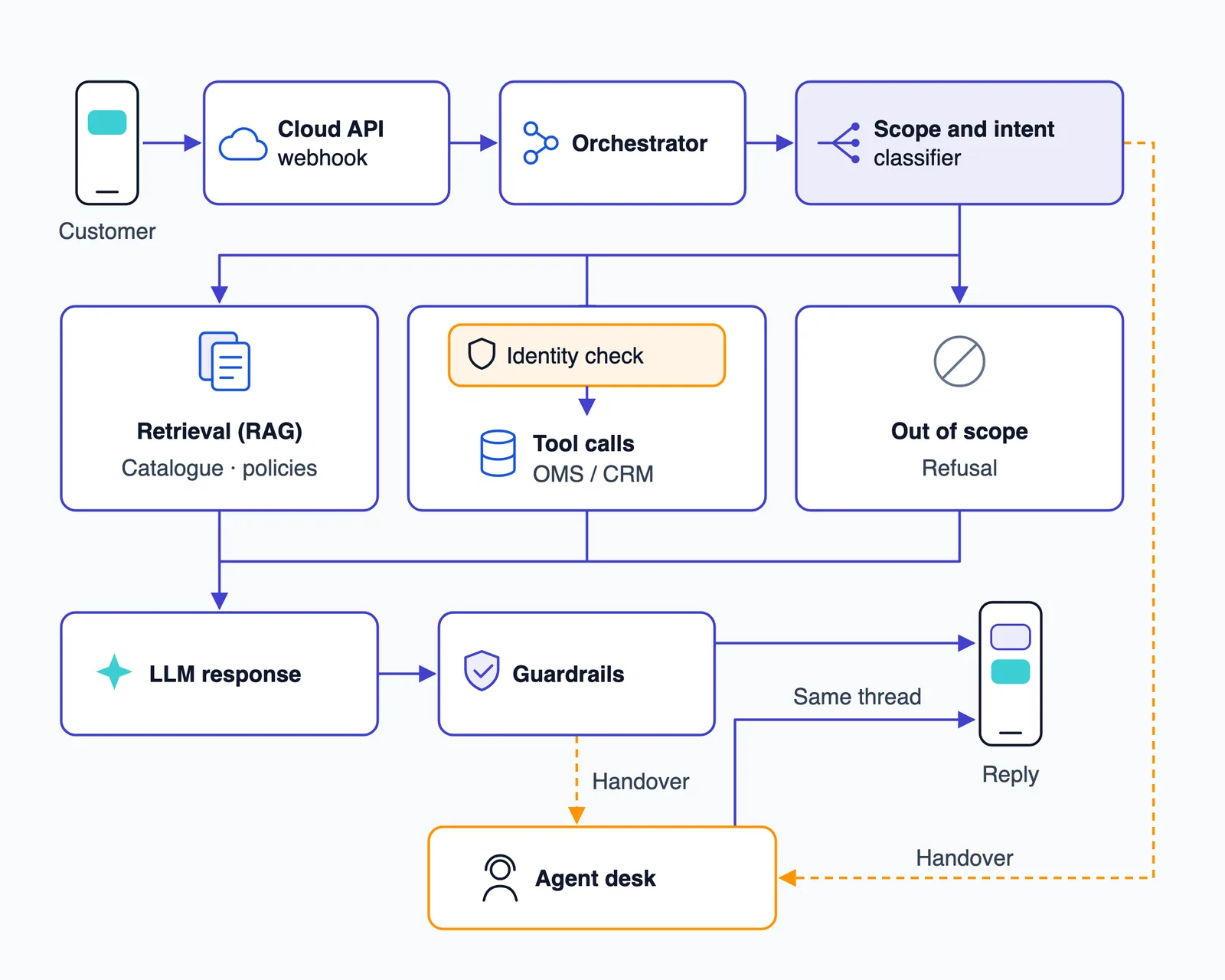
For retail and e-commerce teams, WhatsApp is where "where is my order" questions arrive, along with returns, sizing and delivery-date questions. A production bot that handles these needs more than a prompt and a model. Each message takes this path:
- Inbound message. The WhatsApp Cloud API sends the customer's message to your webhook, along with the sender's phone number.
- Orchestrator. Your service loads the conversation state. Is the bot active on this thread or paused for an agent? Has this customer been verified in this session?
- Scope and intent classifier. This step sorts the message into one of four buckets: an in-scope question that needs knowledge, an in-scope action that needs data (order status, start a return), out of scope, or a handover trigger.
- Retrieval or tools. The bot either runs RAG over your catalogue and policies, or calls tools on your OMS or CRM once identity has been checked.
- LLM response. The model drafts a reply using only the retrieved context or the tool results.
- Guardrails. The draft is checked for personal data shown without verification, promises outside policy, off-topic content and excessive length.
- Reply. The answer goes out through the Cloud API, as text or as a native catalogue message.
Handover can trigger at step 3 (the request needs a human) or step 6 (the draft fails a check and no safe answer exists).
Grounding answers in your catalogue and policies
Retrieval-augmented generation (RAG) means the bot searches your documents first, and the model writes its answer from what the search returned. For a retail bot, the documents are usually the return and exchange policy, the shipping and delivery policy, warranty terms, size guides and the product catalogue.
Three things tend to go wrong:
- Stale catalogue data. Prices and stock change every day. Sync the catalogue from its source (your commerce platform or PIM) on a schedule or on change events. When an answer depends on live price or stock, fetch it with a tool call rather than reading it from the index.
- Policy versions. When the returns window changes for a sale, the bot needs to know which version applies to which order date. Store each policy's version and effective date as metadata, and log which version every answer used. Then, if a customer disputes what the bot said, you can see exactly what it said and why.
- Weak retrieval. If the top results score low or don't contain the answer, the bot should say it doesn't know and offer a person. Don't let the model fill the gap from general knowledge. This one guardrail prevents more bad answers than any other.
For product questions, show the products instead of describing them in paragraphs. WhatsApp's native catalogue messages support a single product, a multi-product message with "up to 30 products organized into sections", and a product carousel. Carts allow up to 99 units per item, and orders come back to you by webhook (Meta Cloud API docs). The bot picks the SKUs and WhatsApp displays them.
We've written more about how RAG keeps a chatbot from inventing answers.
Order lookups with tool calls, not guesses
An order status must never come from the model. The model's job is to recognise the request, call a tool such as get_order_status(order_id), and phrase the result. If the tool fails or times out, the bot says so. It never fills in "should arrive in 2–3 days" on its own.
A typical retail toolset looks like this:
list_recent_orders(phone)andget_order_status(order_id)check_return_eligibility(order_id, item_id)andstart_return(...)get_refund_status(order_id)check_pincode_serviceability(pincode, sku)
Tools that change something, like start_return, need a confirmation step. The bot summarises what it's about to do, the customer confirms, and only then does the call run.
Identity. The sender's phone number from the webhook is your first identity signal. It's enough to say "you have two orders in transit" when the number matches the account. It isn't enough on its own when a family shares a phone or a number has changed hands. Before showing a delivery address, a refund amount or payment details, ask for more: the order ID plus the delivery pin code, or a one-time password sent with an authentication template. Enforce this rule in code, not in the prompt. The tool layer should refuse to return sensitive fields until the session is marked as verified. A customer can talk a model out of a prompt instruction, but not out of a code check.
The hard part is usually the OMS or ERP connection, not the LLM. See how AI connects to existing CRM and ERP systems for how that integration work usually goes.
Keeping the bot in scope
Scope control is where quality and compliance meet. These mechanisms do most of the work:
- An allow-list of intents. The bot handles named intents, and everything else goes to a refusal or a handover. A fixed list is also much easier to test.
- A consistent refusal style. For example: "I can help with orders, returns, delivery and product questions. For anything else, I can connect you to our team." Keep it short and redirect the customer. Don't lecture them.
- Prompt-injection handling. Some customers, and every tester, will type "ignore your instructions". Treat customer text as data, not instructions. Validate every tool argument too: an order ID typed by the customer must belong to the verified phone number before you look it up.
- Weekly log review. Read a sample of conversations each week. Look for new intents customers are asking about, off-topic answers that slipped through, and wrong answers. Feed what you find back into the allow-list and the knowledge base.
This is the practical link to clause 4.7. A narrow bot that answers from your data and declines everything else makes the clearest possible "ancillary" case. It's also the bot that gives the fewest wrong answers.
Handing over to a human inside WhatsApp
When to hand over
Hand over when any of these happens:
- Retrieval confidence is low, or a tool keeps failing.
- A refund or goodwill credit is above a threshold you set.
- The customer is angry. A sentiment check on each message is enough to catch this.
- The bot has failed twice on the same request.
- The customer asks for a person. Always honour this straight away.
- The topic is regulated, as with disputes, fraud reports or complaints in fintech.
How the handover works
Treat handover as something your own system does, not a platform feature you switch on. Here is how it works:
- The orchestrator puts the thread into agent mode, and the bot stops replying to messages from that number.
- A ticket opens in your agent desk with the full transcript, the customer's verification status, any order IDs mentioned and a two-to-three-line summary written by the LLM.
- The bot tells the customer they're being connected and how long it usually takes.
- The agent replies from the desk. Replies go out through the same business number, in the same WhatsApp thread, so the customer never switches apps or numbers.
- When the agent closes the ticket, the orchestrator switches the thread back to bot mode.
Two details are easy to miss. Messages the customer sends while waiting should go to the ticket, not to the bot. And set a pickup timeout so that if no agent responds within your target time, the customer gets an honest update rather than silence.
The 24-hour window applies to agents too
A 24-hour customer service window opens when a user messages or calls the business, and it restarts with each new message from the user. Non-template messages can only be sent while it's open (Meta pricing docs). That rule applies to your human agents just as it does to the bot.
Here's an example. A customer's last message arrives at 8pm on Monday, the ticket is handed over, and nobody picks it up until Wednesday morning. By then the window has closed, so the agent can't send a normal reply. They have to send an approved template, and that template is a billable message. To avoid this:
- Staff the handover queue so tickets are answered well inside the window, including evenings during sales.
- Show when the window closes on every ticket in the agent desk.
- Get a few utility templates pre-approved, such as "We have an update on your request, reply to continue." The customer's reply opens a new window.
What it costs to run: WhatsApp pricing in 2026
Meta charges per delivered message, by category. Marketing, utility and authentication messages are templates. Service messages and Meta Business Agent messages are non-template (Meta pricing docs).
| Category | Typical support use | What changed in 2026 |
|---|---|---|
| Service | Free-form replies from the bot or an agent inside the window | "Each business phone number has one free tier of 1,000 delivered service messages per month." Messages beyond that have been charged since 1 October 2026. |
| Utility template | Shipping updates, refund confirmations, "update on your request" | Utility templates sent inside an open window became billable on 1 October 2026. They were previously free. |
| Authentication template | OTPs for identity checks | Charged per message, like other templates. |
| Marketing template | Promotions, back-in-stock campaigns | India's marketing rate went up on 1 January 2026. |
| Meta Business Agent | Replies from Meta's own AI agent | Charged per token. |
Two more points apply to Indian accounts. They must move to INR billing by 31 December 2026, and from 1 January 2027 Meta stops delivering messages from accounts that haven't. Also, the October changes to service-message pricing don't apply to AI Providers, who fall under a separate policy. That only matters if you are one.
The design consequence is that message count now matters. The free tier is per number, per month, and a brand with real support volume will pass 1,000 service messages early in the month. So:
- Send one complete reply instead of three short messages.
- Don't send filler messages like "Let me check that for you…" as separate messages.
- Use one multi-product message instead of several single-product messages.
- Check that OTP flows don't trigger repeat sends when a customer taps twice.
LLM token costs come on top. Retrieval chunk size and the length of conversation history you send with each call drive most of that cost, so summarise long threads rather than resending the whole transcript every turn.
We've left out rupee rates on purpose. Third-party figures conflict, and Meta has changed pricing more than once this year. Use Meta's current rate card on the pricing page when you model costs.
Build, buy, or use Meta Business Agent
There are now three realistic routes. The newest is Meta's own. Meta Business Agent rolled out globally on WhatsApp in June 2026 after "nearly two years of testing in markets including India and Mexico" (The AI Insider). It answers questions, recommends from your catalogue, books appointments and qualifies leads. Businesses configure when a chat goes to a live agent. There are integrations with Shopify, Zendesk and Shopee, and the Enterprise Business Agent Platform is "designed to work alongside existing customer support teams" (CX Today). Meta plans to charge smaller businesses through WhatsApp Business Premium tiers and large businesses by token usage.
| Criterion | Meta Business Agent | Messaging-platform AI agent | Custom build |
|---|---|---|---|
| Grounding depth | Your catalogue and business information, within what Meta lets you configure | Knowledge-base uploads in the vendor's tools; depth varies by vendor | Your own RAG pipeline, with policy versions, live stock checks, source logging and confidence thresholds |
| OMS/CRM tool calls | Through supported integrations such as Shopify and Zendesk | Vendor connectors and webhooks; in-house systems may need custom work | Any system with an API, including in-house OMS and ERP |
| Identity checks | Limited to what Meta exposes; check current docs | Varies; often basic | Step-up rules you design, enforced in the tool layer |
| Handover | Configurable escalation to live agents | Usually strong, since a shared inbox is the core product | You build it or integrate with your existing agent desk |
| Data control | Runs on Meta's agent | Vendor's environment and model choices | Your infrastructure, your LLM contract, your retention policy |
| Cost model | Premium tiers or per-token billing, plus message fees | Platform subscription, message fees, sometimes AI usage fees | Build and maintenance effort, LLM tokens, message fees |
| Fit for regulated fintech flows | Limited where you need step-up authentication and audit trails | Depends on the vendor | Strongest, because you control every check and every log |
Vendors change their products quickly, so treat the middle and left columns as starting questions for vendor calls, not settled facts.
The decision usually comes down to this. Business Agent suits a small catalogue, standard FAQs and a commerce stack it already integrates with. A messaging platform suits teams whose main need is a shared inbox with some automation on top. If you need order lookups, identity checks and handover wired into your own systems, you're looking at a custom AI chatbot build rather than a configuration job. Some teams combine the last two: they keep a platform's inbox for agents and run their own orchestrator for the bot logic.
Variations for fintech and education
Fintech
Fintech support bots need step-up authentication before showing any account detail. The phone number alone is never enough. Common intents are account servicing, KYC status, statement requests and card blocking, all done through tool calls.
- Card blocking is the one case where speed beats ceremony. Verify the customer, confirm which card, call the block tool, and log the action with a timestamp. Make the tool safe to call twice, so a retry doesn't cause a second action.
- KYC status should be read-only. The bot reports where things stand and what's missing, and document uploads go through your own secure flow.
- No financial advice. "Should I invest in this fund?" belongs in the out-of-scope bucket, along with anything that sounds like a dispute or a fraud report. Those go straight to a human.
Plan for India's DPDP Rules too. They were notified in November 2025 with a phased rollout, and the core consent and Data Fiduciary obligations apply 18 months after notification, which puts them around May 2027 (Mondaq). Confirm the exact date against the notified Rules. Consent capture and retention settings you design now will be much cheaper than ones you retrofit later.
Education
Schools and edtech platforms see the same pattern around admissions and fees. Typical intents are admission status, fee dues and receipts, timetables and results.
- Parent vs student identity. Map each phone number to a role. A parent's number might see fee status and attendance, while a student's sees timetables. Results and anything personal should only be shown after verification, because family phones are often shared.
- Peak loads. Traffic spikes during admission season and on results day. Load-test the orchestrator, get your templates approved well before those dates, and staff the handover queue for those weeks specifically.
A rollout plan
- Pick 5–10 top intents from your ticket logs. For most retail teams, order status, returns and delivery questions cover a large share of volume. Check your own logs rather than assuming.
- Build the knowledge base and tools. Write clean, versioned policy documents, set up catalogue sync, and build the order tools with identity checks enforced in code.
- Run in shadow mode. The bot drafts each reply and an agent approves, edits or rejects it before it goes out. The edits show you where grounding and scope are weak.
- Go live on a subset of intents with handover enabled. Start with read-only intents like order status before anything that changes data, like returns.
- Track three numbers. Containment rate is the share of conversations resolved without a human. Handover rate is the share passed to an agent. Wrong-answer rate comes from a weekly sampled review. Don't chase containment alone: a bot can raise containment by being confidently wrong.
- Widen the scope. Add intents one at a time, and only when the three numbers are stable for the ones already live.
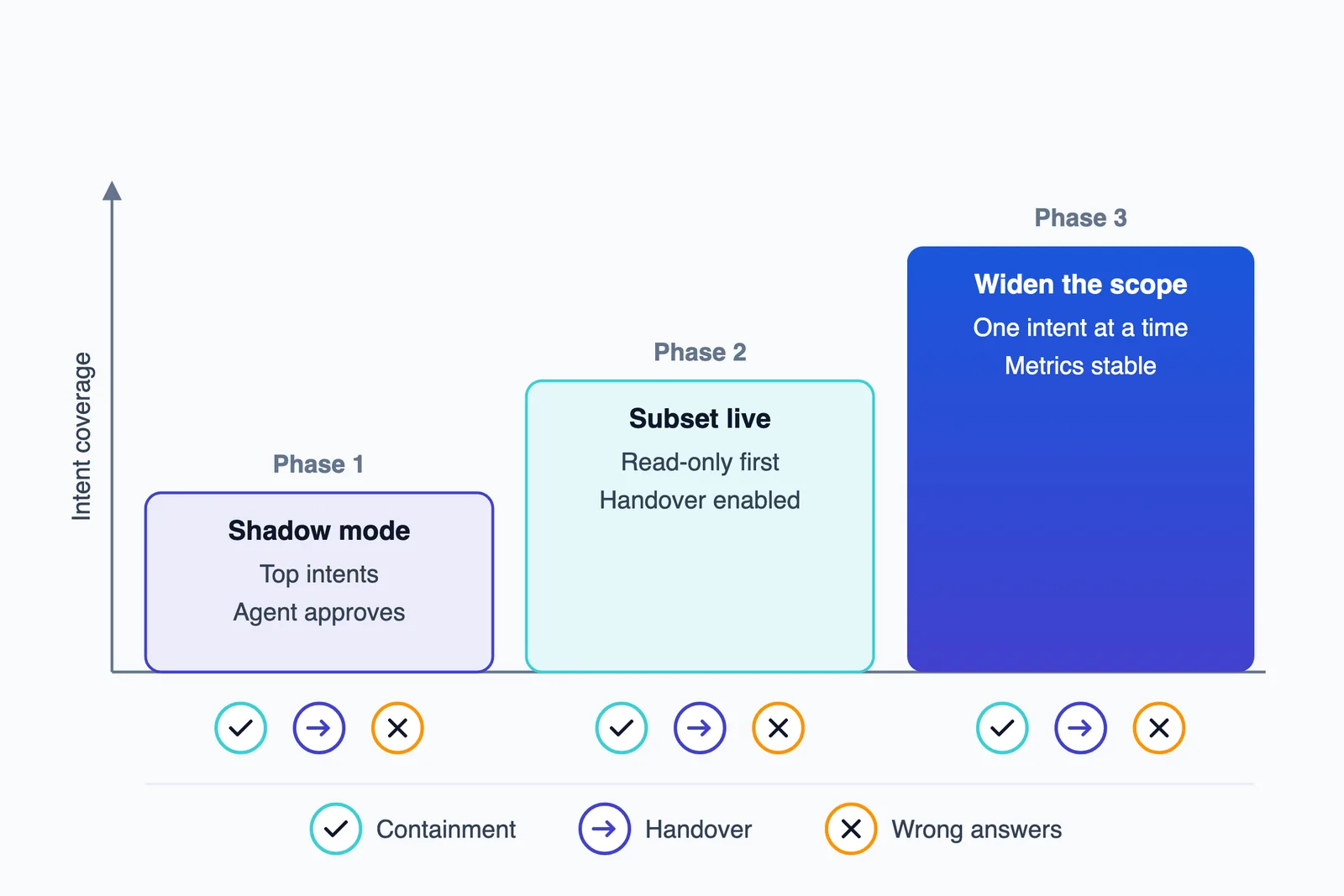
This order also keeps the compliance story clean. At every stage, the bot is plainly a support tool for a defined set of business tasks.
Frequently asked questions
Are AI chatbots banned on WhatsApp in 2026?
No. Meta's terms restrict general-purpose AI assistants on the WhatsApp Business Platform where AI is the "primary (rather than incidental or ancillary) functionality." Business bots that support a real service, such as customer support, order tracking, bookings or account servicing, are allowed. Meta has said a company running a bot for customer service won't be barred.
Can I use ChatGPT or another LLM to power my WhatsApp customer service bot?
Yes, as long as the bot serves your business and doesn't act as a general assistant. Meta's terms let businesses retain an AI provider as their solution provider. Check that your LLM vendor doesn't train on your chat data, because the terms prohibit using platform data to train or improve AI models. The only exception is fine-tuning a model for your exclusive use.
How does a WhatsApp chatbot hand over to a human agent?
Your system pauses the bot on that conversation and sends it to an agent desk with the full transcript and a short summary. The agent replies from the same business number, in the same WhatsApp thread. They can reply freely while the 24-hour customer service window is open, and need an approved template once it closes. When the ticket closes, the bot takes the thread back.
Can a WhatsApp chatbot check order status?
Yes. The bot calls your order management system through an API, using the order ID and the customer's phone number, and returns the live status rather than generating one. Before showing sensitive details such as addresses or refund amounts, it should verify identity with an order ID and pin code or a one-time password.
How much does a WhatsApp AI chatbot cost to run in India?
There are two running costs: Meta's per-message fees and the LLM's token costs. Since 1 October 2026, service replies beyond 1,000 a month per business number are charged, and utility templates sent inside the window are billable. Indian accounts must move to INR billing by 31 December 2026. Check Meta's current rate card for exact rates.
Should I use Meta Business Agent or build a custom WhatsApp bot?
Meta Business Agent suits businesses with a small catalogue, standard FAQs and a commerce stack it already integrates with, such as Shopify or Zendesk. A custom build makes sense when you need deep tool calls into your own OMS or CRM, enforced identity checks, regulated workflows like fintech account servicing, or full control over where your customer data goes.