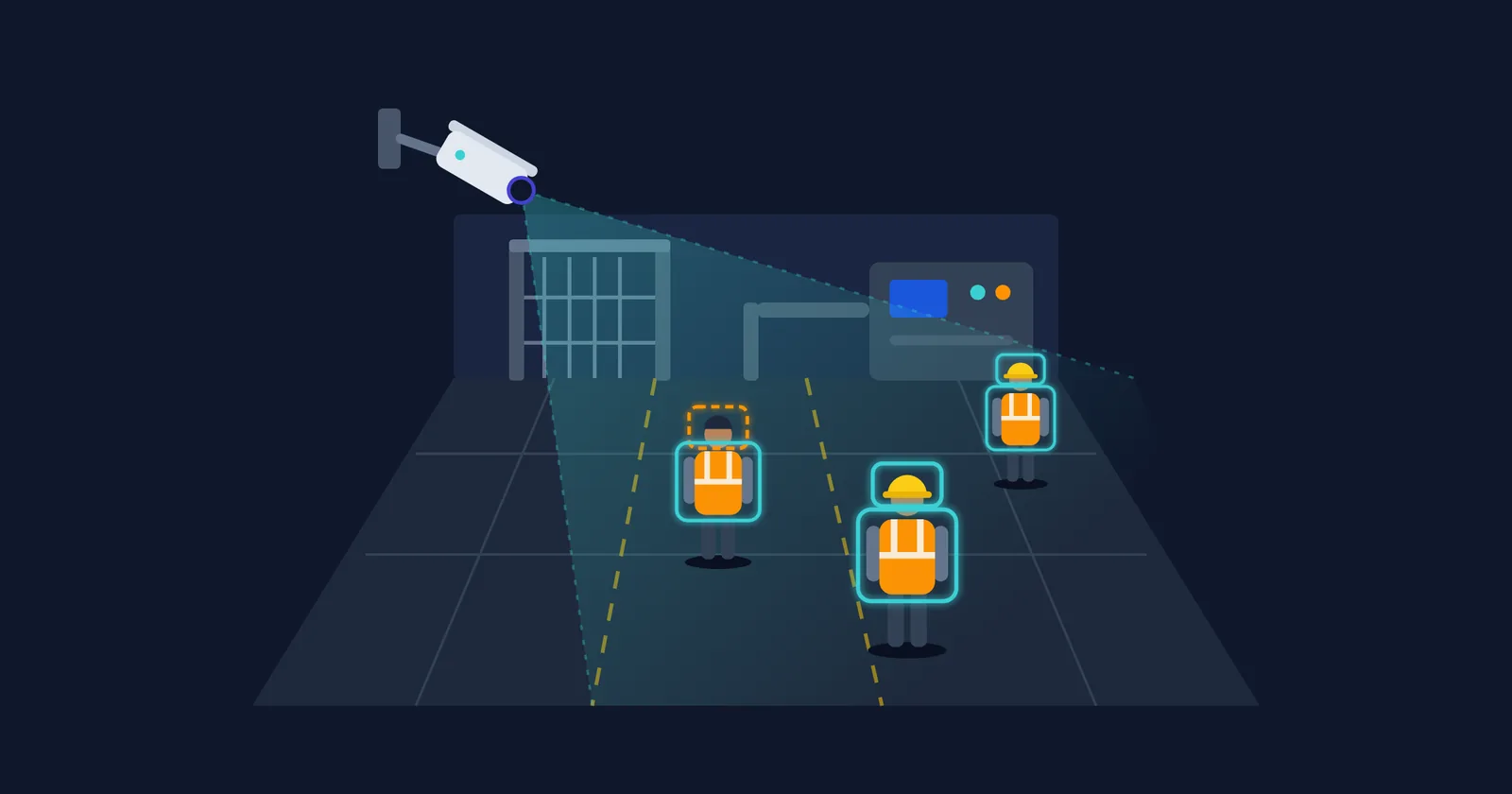

Almost every vendor pitch for PPE detection using CCTV includes the same line: it works on your existing cameras. That is partly true. Most plants with IP cameras can run a detection model on those feeds without new cabling. Whether the system catches a missing helmet at the far end of a bay, or fills a supervisor's phone with alerts about orange shirts, depends on what the pitch leaves out: how many pixels land on each worker, the angle the camera sees them from, how alerts are confirmed and routed, and how the system handles shift changes.
In India the case for doing it is strong. In 2021 the all-India general inspection rate for factories was 14.65%, and 26.02% for hazardous factories, according to the DGFASLI 2022 report as summarised by Insights IAS from The Hindu. The same analysis notes that "each of the 953 sanctioned inspectors would have had to inspect 337 registered factories in a year, in 2021." External inspection can't watch a plant continuously. If you want to know whether people wear their gear on the night shift, the plant has to do the watching itself.
This is an engineer's walkthrough of what that takes. The worked example is our own PPE detection deployment across 32 existing cameras in four facilities. Two ideas run through the whole piece. The camera decides what you can detect before any model does. And alert quality decides whether anyone keeps using the system.
How PPE detection using CCTV actually works
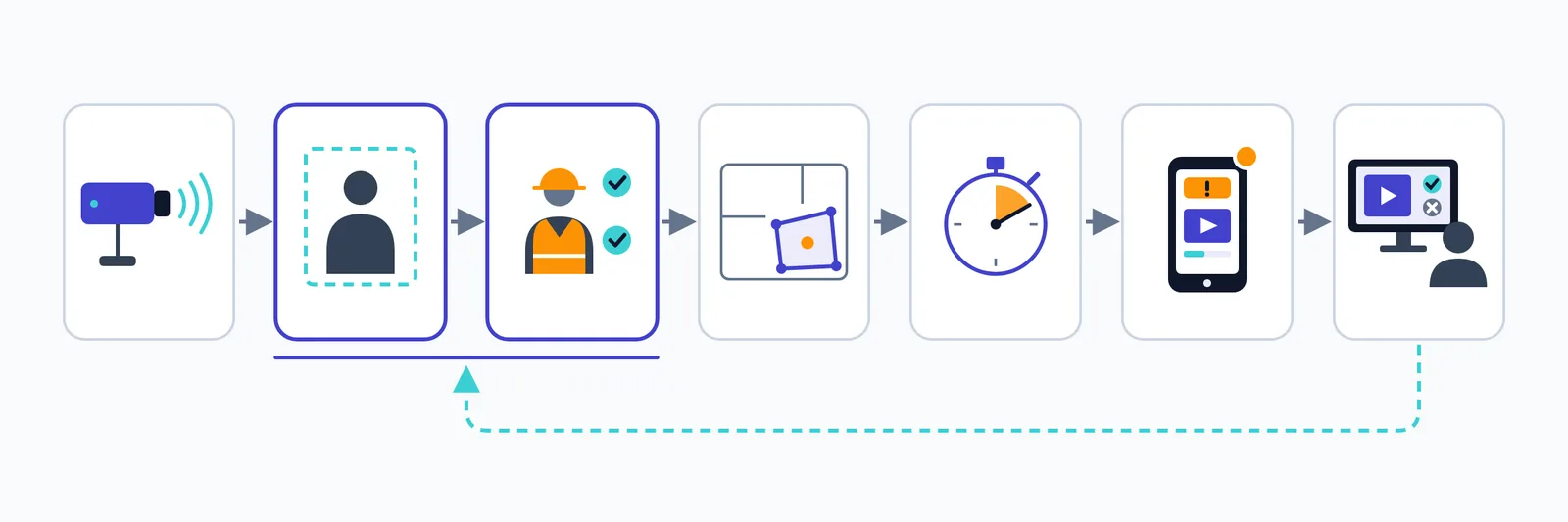
A PPE detection system is a chain of steps, and each step can fail in its own way. When a pilot disappoints, the cause is usually one specific link in this chain, not "the AI".
- Stream ingest. The system pulls RTSP video from each camera or from the NVR, and uses ONVIF for discovery and configuration. Typical failures: streams that drop, NVRs that only expose a low-resolution substream, and camera clocks that drift so evidence timestamps are wrong.
- Person detection. A model finds every person in the frame. It fails on people half-hidden behind pallets or machinery, on crowds at a gate, and on workers so far from the camera that they are only a few dozen pixels tall.
- PPE check per person. For each detected person, a second model or detection head decides whether a helmet, vest, gloves, shoes, glasses or other gear is present. Small items and look-alikes cause most errors here.
- Zone rule. The system looks up what this area requires. A worker without a face shield in a corridor is fine. The same worker in a welding bay is a violation. Wrong or outdated zone polygons produce alerts that are technically right and operationally useless.
- Temporal confirmation. A tracker follows each person across frames, and the system only flags a violation if it lasts a set time. If the tracker loses the person or swaps identities between two workers, confirmation breaks.
- Alert, evidence clip and human review. A confirmed violation goes to the right person with a short clip. A supervisor confirms or dismisses it, and the dismissals become training data.
Steps 2 and 3 are where generic, pre-trained detectors struggle in real plants. Uniforms, helmet colours, lighting and camera angles vary too much from one site to the next. That is why we build a custom computer vision system trained on your own site footage rather than shipping a generic detector. Steps 1, 4, 5 and 6 are plain engineering, and they decide as much of the outcome as the model does.
Start with a camera audit, not a model
Most deployments are won or lost before anyone trains anything. You can audit your own cameras with a few screenshots and a tape measure before you talk to a vendor.
Pixels on the target: resolution and distance
The number that matters is pixel density: how many horizontal pixels cover one metre of the scene at the distance where workers stand. The camera's megapixel rating only tells you part of that.
The surveillance standard IEC 62676-4 gives a rough reference. As Axis explains in its white paper, it sets 25 px/m for detection, 63 px/m for observation, 125 px/m for recognition and 250 px/m for identification, assuming a face width of 16 cm. Axis also points out that these definitions are written for human operators watching video, and that video analytics use different definitions. So use them as a sanity check, not a specification.
The arithmetic is simple. A 1080p camera produces frames 1,920 pixels wide. If that frame covers a 20 m-wide aisle at the working distance, you get about 96 px/m. Point the same camera so it covers 40 m and you drop to about 48 px/m. A helmet is roughly a quarter of a metre across, so that is the difference between a helmet about 24 pixels wide and one about 12 pixels wide. Gloves and safety glasses are much smaller, so they lose detail first.
Then check what the analytics actually receive. Many NVRs pass a low-resolution substream to third-party software to save bandwidth. If the model reads a 640-pixel-wide substream, the same 20 m aisle falls to 32 px/m. Heavy compression at low bitrates also smears the edges of small objects and adds blocky artefacts, especially when people move. Audit the stream the model will see, not the one on the control-room monitor.
PPE detection camera placement: height and angle
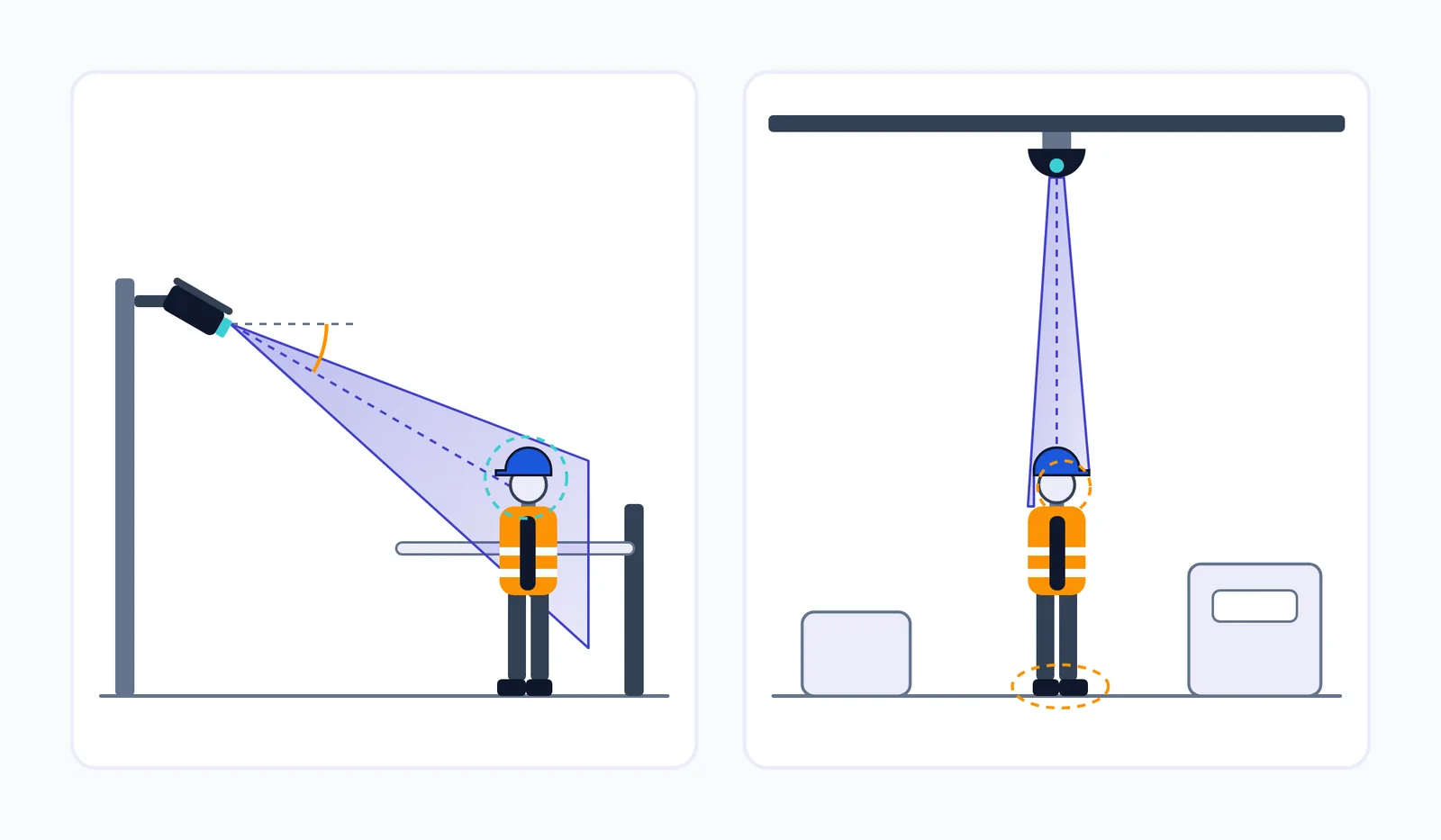
Vendor guidance is fairly consistent here. Mikshi recommends mounting cameras 2.5–3.5 m high, angled 15–30° downward at entry points, to capture helmets and vests. That geometry suits helmet detection on CCTV and safety vest detection. You see the head, torso and front of the body at a useful size.
It does not suit everything. iFactory notes that footwear needs overhead or low-angle mounting. A high dome camera over a shop floor, which many plants have, sees the top of a helmet and the shoulders. Faces, masks and boots are hidden by foreshortening or simply out of view. That camera can still check helmets. It cannot check respirators, whatever the model.
The same geometry problem decides plate reads, as we covered in how ANPR works and where it fails. In both cases, the useful question for each camera is: which items can this view physically show?
Light, dust, steam and night shifts
Indian plants are hard on cameras. Furnace doors and molten metal cause glare that washes out nearby workers. Steam in chemical and food plants softens edges and lowers contrast. Cement plants and construction sites coat lenses in dust, so a feed that looked fine at commissioning slowly degrades. Monsoon rain on an outdoor lens produces streaks and droplets that can look like objects.
Night shifts change the input completely. When a camera switches to IR mode, the video turns greyscale, so a vest detector that relies on fluorescent orange or yellow stops working after dark. Retroreflective strips often show up brightly under the camera's own IR illuminator, so the model has to learn shape and stripe patterns, not colour. This is why the training data in our deployment, 45,000 images, deliberately covered rain, dust, bright sun and night-shift lighting rather than clean daytime frames.
Construction sites add rotating crews and cameras that move as the build progresses. See our work on AI for construction safety and site monitoring for how that changes the setup.
What each PPE item needs from the camera
Use this table during the audit. It is qualitative on purpose: the right pixel density depends on your model and footage, and you confirm it by testing, not from a spec sheet.
| PPE item | Typical size in frame | Best camera angle | Difficulty | Common confusions |
|---|---|---|---|---|
| Helmet | Small but distinct, on top of the person box | Front or high-angle; works from most views | Low to moderate | Caps, turbans, scarves, hair in some lighting, helmets carried by hand |
| Hi-vis vest | Large, covers the torso | Front or side at 2.5–3.5 m | Low in daylight, higher on IR night footage | Orange or yellow shirts, unbuttoned or folded vests, vests over a shoulder |
| Gloves | Very small, often moving | Close, near the task or workstation | High | Skin tone in poor light, tools held in the hand, motion blur |
| Safety shoes | Small, at the bottom of the frame | Low-angle or overhead at a gate | High | Ordinary dark shoes; often hidden by occlusion |
| Glasses or face shield | Very small (glasses) to moderate (shield) | Front-facing, close, at face height | High for glasses, moderate for shields | Prescription glasses, reflections, shield raised but not lowered |
| Mask or respirator | Small, on the face | Front-facing, close | Moderate to high | Beards, scarves, hands near the face, mask pulled under the chin |
| Harness | Thin straps across the torso | Front or side, close; at height-work locations | High | Bag straps, vest seams; harness worn but not clipped on |
Two rows say "worn but not clipped on" and "raised but not lowered". A camera can often confirm an item is present. It usually cannot confirm the item is being used correctly. Be clear about that limit with the safety team from the start.
False positives and alert fatigue
A system that misses some violations is disappointing. A system that raises dozens of false alerts per shift gets muted, and once supervisors learn to ignore it, the project is effectively over even if the dashboard stays on.
Where false alarms come from
In our deployment, generic pre-trained detectors produced a 34% false-alarm rate before site-specific work. The causes are predictable:
- Look-alikes. Caps and scarves read as helmets (giving missed violations) or helmets in an unusual colour read as no helmet (giving false alarms). Orange work shirts read as vests.
- Partial occlusion. A worker behind a pallet, forklift or railing shows only a head and shoulders, and the model reports the missing vest it cannot see.
- Motion blur. Fast movement close to the camera, especially at low frame rates and with heavy compression.
- Gear in transition. Someone adjusting a helmet strap or taking a vest off at the gate is, for a second, not wearing it.
- Things that aren't workers. Mannequins, posters of people, and reflections in glass control-room windows.
Zone rules and temporal confirmation
Two design choices remove most of that noise.
Temporal confirmation. Our deployment raises an alert only when a violation persists for 3 seconds across frames for the same tracked person. That one rule filters out blur, brief occlusion and someone fixing a strap, because those rarely last that long.
Zone rules. The plants in our project had 6 safety tiers, each with its own PPE requirements. Welding zones, for example, need face shields and heavy gloves. Corridors don't. Applying the right rule to the right polygon stops the system from flagging people for gear they don't need where they are standing.
Two more controls keep PPE violation alerts manageable:
- De-duplication. One person walking through a bay without a helmet should produce one alert, not one per camera or one per minute. Link alerts by tracked person and zone within a time window.
- Suppression windows. At known transition points, such as the changing area or the first few metres inside a gate, give people a grace period to finish putting gear on before you alert.
Test on your own footage before you trust a number
Accuracy figures move a lot between sites. In Al-Azani et al. (IEEE Access, 2024), the researchers built a surveillance-camera PPE dataset of about 7.7 million labels across 386,011 frames. Their best YOLO models reached a mAP of 92.36% on one test set and 66.70% on a second test set. Same models and same research team, yet a gap of more than 25 points. Any vendor accuracy figure tells you about their test data, not your plant.
Set acceptance criteria per camera and per PPE class before the pilot starts:
- Precision: of the violations flagged, how many were real.
- Recall: of the real violations in a labelled sample of your footage, how many were flagged.
- False alerts per camera per shift: the number supervisors actually feel.
A camera that passes for helmets and fails for gloves should go live for helmets only. Accuracy also drifts when uniforms change, seasons change the light, or someone moves a camera. Plan for retraining; our MLOps playbook for production models covers monitoring for drift.
Edge vs server processing
Where the model runs affects latency, bandwidth, privacy and who keeps it running. There are four common options.
| On-camera analytics | On-site edge box | On-prem GPU server | Cloud | |
|---|---|---|---|---|
| Alert latency | Lowest | Low; no internet dependency | Low on the local network | Depends on uplink; adds a round trip |
| Bandwidth off site | Metadata only | Alerts and clips only | Alerts and clips only | Full video streams upstream |
| Does video leave site? | No | No, unless you send clips | No | Yes |
| Model flexibility | Limited by camera firmware and chip | Custom models, sized to the box | Custom and larger models | Largest |
| Maintenance | Per camera, often vendor-locked | One device per site | Server room, IT ownership | Provider-managed compute, your pipeline |
| Multi-site rollup | Needs a separate layer | Via a central dashboard | Via a central dashboard | Built in |
For most Indian plants, an on-site edge box is the practical default. In our deployment, all 32 feeds ran on a single compact computer unit on site. Alerts didn't depend on internet delays, and a central dashboard gave the four facilities a combined view. The cloud was optional, used only for rollup and reporting, not for inference.
Sizing the hardware for edge AI video analytics comes down to three numbers multiplied together: the number of streams, the frames per second you actually analyse, and the cost of the models per frame. You rarely need to analyse every frame at 25–30 fps. PPE status changes over seconds, not milliseconds, so a few frames per second per stream is usually enough to track people and confirm a 3-second violation. The difference is large: 32 streams at 25 fps is 800 frames a second to process, while 32 streams at 4 fps is 128. Busy cameras cost more than quiet ones, because the PPE check runs once for every person detected, so size the hardware for the gate at shift change, not the average hour.
Shift changes, contractors and who gets the alert
Many deployments treat shifts as a column in the monthly report. They need to be built into how alerts are sent and who receives them.
Why violations cluster at handover
iFactory reports, in a vendor case study of a chemical plant, that 70% of violations happened in 20-minute shift-transition windows. Treat the exact figure as vendor-reported, but the mechanism is easy to believe. People put gear on and take it off around the gate and changing rooms, outgoing workers relax before the end of their shift, and supervisors are busy with handover paperwork at exactly that time. Those minutes are also when the most people pass the cameras, so they are the peak load for both the hardware and the alert queue.
Routing alerts by shift
An alert sent to a day-shift supervisor at 2 a.m. is wasted. Recipients should follow the shift roster, so the system needs to know who is on duty in each zone. Night shifts need a named escalation owner. Otherwise an unacknowledged alert just expires. A daily compliance summary per shift, broken down by zone and PPE item, gives managers something to act on in the morning meeting. Alerts are most useful when they land in the systems supervisors already use; see how we connect AI to existing systems such as messaging, ERP and EHS tools.
Contract labour and rotating crews
A large share of the workforce on many Indian sites is contract labour, and gear issue differs by contractor: different vest colours, different helmet types, sometimes none at all on day one. Include each contractor's kit in the training data, and feed per-contractor compliance back to whoever manages that contract.
Be explicit about what the system records. A PPE detection system tracks what a person is wearing as they move through the frame. It doesn't need to know who they are. If you don't add face recognition or badge matching, say so in the policy and the worker briefing, because people will assume you have. iFactory also argues that coaching beats punishment. That matches what makes these systems last: if the clips are used to coach crews and fix gear supply problems, workers adapt; if they are used only for penalties, people learn where the cameras are.
Indian compliance: OSH Code and DPDP
Two pieces of law shape how you run AI safety monitoring in a factory in India. This section is a practical summary, not legal advice.
OSH Code. The Occupational Safety, Health and Working Conditions Code, 2020 has been in force since 21 November 2025 under Notification S.O. 5321(E). It puts the duty to provide a safe workplace on the employer. Continuous PPE compliance monitoring gives you evidence of how that duty is met day to day, beyond what periodic audits can show. Ask counsel which specific provisions apply to your site.
DPDP Act. CCTV footage of identifiable workers is personal data. According to King Stubb & Kasiva's analysis, Section 7(i) covers processing "for the purposes of employment or safeguarding the employer from loss or liability", which can support safety monitoring. The same commentary advises tying CCTV use to a defined objective, not keeping footage longer than necessary, and restricting access. The core provisions, Sections 3–17, are scheduled to take effect on 13 May 2027, so systems designed now should be ready for them.
Design choices that follow from this:
- A defined retention period for violation clips, shorter than general CCTV retention where possible.
- Role-based access so only named safety staff can view or export clips.
- Signage at monitored areas and a written monitoring policy shared with employees and contractors.
- Recording PPE status and zone, not identity, wherever the use case allows.
An 8-week path from camera audit to live alerts
Our deployment went from audit to live alerts in eight weeks, with no new cabling or camera replacement. The timeline below follows that project. The third column is what tends to slow things down: the decisions only the plant can make.
| Weeks | Work | What the plant team owns |
|---|---|---|
| 1–2 | Camera audit and site setup: stream access, pixel density and angle checks, edge unit installation, footage collection | NVR and network access, a list of cameras, IT security sign-off |
| 3–4 | Training PPE recognition on site footage, including night, dust and contractor kit | Zone definitions and the PPE required in each tier; examples of each contractor's gear |
| 5–6 | Worker tracking, temporal confirmation and live monitoring in shadow mode | Supervisors reviewing flagged clips and marking false alarms |
| 7–8 | Dashboard, alert routing and go-live | Alert-owner roster by shift; sign-off on per-camera acceptance criteria |
Camera access and agreement on zone rules are the two items that most often push a timeline out. Also remember that a pilot on four cameras is not a deployment on forty. Moving an AI prototype into production explains what changes when you scale: monitoring, retraining, hardware headroom and support ownership.
How to read PPE detection results, including ours
Vendor case studies in this category usually lead with a large percentage. Before you compare them, check how the "before" number was produced.
The most common problem is a baseline that isn't comparable. iFactory's chemical-plant case reports monthly violations falling from 340 to 85. But the "before" figure comes from supervisor walk-downs, which the page itself suggests probably undercounted, and the "after" figure comes from AI counting. When the counting method changes between periods, part of the change you see is just the new method, and the two numbers can't be compared directly.
Questions to ask of any result:
- What exactly was measured: violations, compliance rate, alerts, or incidents?
- Over which cameras and areas, and did coverage change between before and after?
- Were false alarms removed from the counts, and who reviewed them?
- Over what period, and did it include night shifts and contractor peaks?
Our own numbers need the same reading. The project began with 85% of active areas unmonitored during standard shifts and no structured incident records. The reported results, with their exact labels, were:
- Compliance rate: 68% → 99.1%
- Detection-to-alert time: 45–60 minutes → under 3 seconds
- Camera coverage: 4 spot-checked cameras → 32 monitored continuously
- Video reviewed: 20 hours → 23,000+ hours per month
- "94% reduction in unnoticed safety violations" in eight weeks
The important word in that last line is "unnoticed". Much of the gain comes from removing the blind spot: violations that already happened but nobody saw now reach a supervisor within seconds. That is the right thing to buy a PPE detection system for. It isn't the same claim as "violations fell 94%", and you should hold every vendor, including us, to that distinction. If you want to know what your own cameras can support before you trust any number, talk to an engineer about a camera audit.
Frequently asked questions
Can PPE detection work on existing CCTV cameras?
Usually, yes, if the cameras are IP or ONVIF-compatible and put enough pixels on workers at their working distance. Our deployment used 32 existing cameras with no new cabling. Analogue cameras, low-resolution NVR substreams and wide cameras covering a whole yard often need a few cameras added at gates or work zones, but rarely need the whole system replaced.
What camera resolution do you need for PPE detection?
Pixel density at the working distance matters more than the megapixel rating. A 1080p camera covering a 20 m-wide area gives about 96 px/m; covering 40 m it gives about 48 px/m, which halves the size of every helmet in the frame. Helmets and vests work at lower densities than gloves or glasses. Check the stream the analytics actually receive, and test each camera on your own footage.
How accurate is AI PPE detection?
It depends on the site, the camera and the PPE item. In one IEEE Access study, the same YOLO models scored 92.36% mAP on one test set and 66.70% on another, so a headline figure from a different site tells you little. Set per-camera, per-item acceptance criteria for precision, recall and false alerts per shift, and only go live on the combinations that pass.
Does PPE detection need the cloud or a GPU server?
No. A single on-site edge unit can handle dozens of feeds; our deployment ran all 32 on one compact computer on site, with alerts that didn't depend on internet delays. Most PPE checks don't need every frame analysed, which keeps hardware small. The cloud is optional and mainly useful for combining dashboards across several sites.
How long does it take to deploy PPE detection in a plant?
Our deployment took eight weeks from camera audit to live alerts across four facilities: two weeks of audit and setup, two of training, two of tracking and shadow-mode monitoring, and two of dashboards and alert routing. The things that most often lengthen the timeline are getting camera and network access and agreeing zone rules with the safety team.
Is CCTV-based PPE monitoring allowed under Indian data protection law?
Section 7(i) of the DPDP Act covers processing for employment purposes and for protecting the employer from loss or liability, which can support safety monitoring. Keep the monitoring tied to safety, limit how long clips are kept, restrict who can view them, put up signage and record PPE status rather than identity where you can. The core provisions take effect on 13 May 2027. Take legal advice for your site.