
By now you have probably seen two kinds of demo. A platform vendor shows a menu of pre-trained models (PPE, intrusion, line-crossing, people counting) with a per-camera monthly price. A custom builder offers to train a model on your own footage, for your own process. Custom computer vision vs video analytics platforms looks like one decision for the whole site. Usually it isn't.
The right answer changes from job to job. For perimeter alerts on a clean fence line, a platform is often the sensible buy. The same platform may have nothing on its menu for counting cement bags that overlap on a moving loader, or for checking that a dock SOP was followed in the right order. Many Indian plants and warehouses end up needing both, with both reading the same camera streams.
This guide covers the types of vendor, a test that sorts each job, a decision table, the shape of the costs over three years, the Indian rules that apply, and a low-risk way to test before you sign.
What you are actually choosing between
Off-the-shelf video analytics platforms
Off-the-shelf video analytics comes in four common forms:
- Cloud or SaaS analytics running on your existing cameras, paid per camera per month.
- VMS software with analytics add-ons, usually licensed per channel.
- Camera-bundled platforms, where the hardware comes with a set number of licence years.
- Analytics built into the camera itself.
They share a menu of pre-trained models (PPE, intrusion, line-crossing, loitering, counting, ANPR), rules you configure, a dashboard and the vendor's roadmap. Pricing varies a lot. Surveillant lists seven pricing models, from perpetual per-camera licences with maintenance to quote-only enterprise deals.
Custom computer vision
Custom computer vision systems are models trained on your footage for your process. They are deployed on-device, on an on-prem server or in the cloud, and the code and model are handed over to your team. There is also a middle path. Fora Soft describes it as "extend or assemble": you keep a platform and add a custom layer for the jobs it can't do.
Self-serve model-training tools are a third option, but they assume you have ML engineers in-house. Most mid-size plants and 3PLs don't.
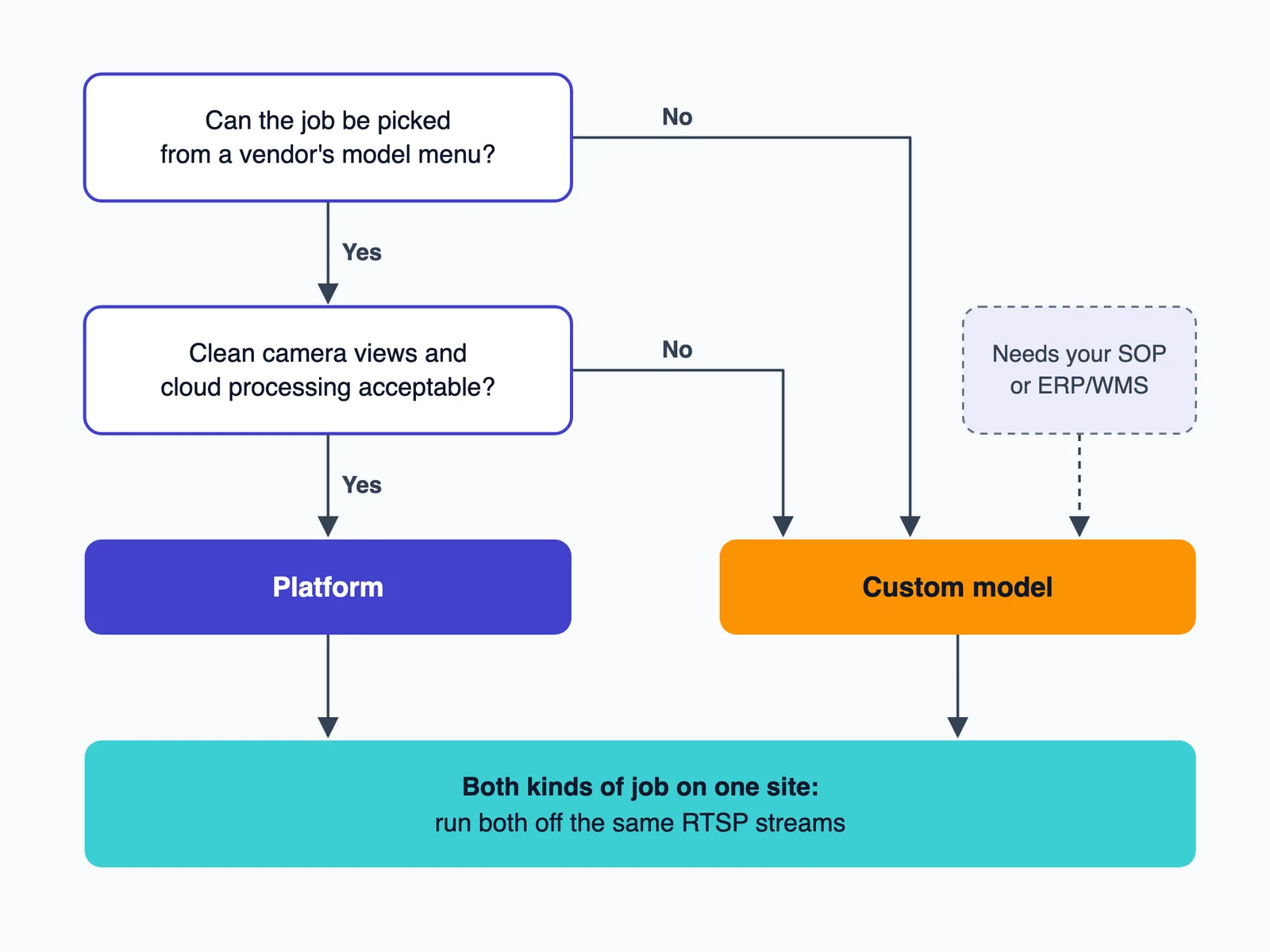
Standard jobs vs non-standard jobs: the test that decides most of it
Jobs platforms already do well
These jobs include PPE checks in clear views, perimeter intrusion, line-crossing, people counts at a clean doorway and basic ANPR at a controlled gate. Every buyer wants roughly the same output from them, so the vendor's models have already seen thousands of similar scenes. Where views are clean, a platform can usually be configured rather than trained. If PPE is your first job, our guide to PPE detection using CCTV in Indian plants covers the deployment detail.
Jobs that are yours alone
Other jobs have no dropdown entry:
- Bags that overlap or sit in stacks on a truck-loader.
- Carton counts at a 3PL dock while a forklift blocks the view.
- Packing-line checks against your own SKU list.
- Checking that a dock SOP was followed, step by step, in the right order.
- A loading-bay count tied to a specific dispatch note.
Pre-trained models struggle here because your process defines both the object classes and the "correct" answer. Indian sites then add their own conditions: dust at a cement packer, glare through open bay doors, monsoon rain on lenses, night IR on the third shift, and crowds of contract labour at shift change. Counting bags that overlap on a moving loader is the kind of job we scoped in our cement bag counting and dispatch monitoring system. That system's approach uses camera-based counting tied to loading progress and dispatch records.
A quick test for each job:
- If you can describe the job by picking from a vendor's dropdown, buy it.
- If describing it needs your SOP document, a SKU master or a dispatch note, it is a custom job.
- If your site has both kinds of job, plan to run both systems.
See It Working: Custom Computer Vision on a Dispatch Line
This demo shows a non-standard job running on a cement bagging and dispatch line. An overhead camera detects each bag on the conveyor and counts it once as it crosses the counting line, and a dispatch dashboard checks the live count against the order target and tracks loading progress. Counting against your own dispatch orders is a job tied to your process, not a generic platform feature, and that is the kind of job where a custom model earns its place.
Have a job that follows your own SOP? Let's talk about building it for your site. Call +91 95372 90206 or message us on WhatsApp and we'll walk you through it.
Custom computer vision vs video analytics platforms: the decision table
Use this with the quotes you already have. The last column is what to ask either vendor.
| Factor | Off-the-shelf platform | Custom computer vision | What to ask |
|---|---|---|---|
| Fit for non-standard jobs | Only what is on the menu | Trained on your footage and your SOP | "Show me this exact job running on a scene like mine." |
| Time to go live | "Days to weeks" for menu jobs, per Fora Soft | At AtlasML, a proof of concept can be ready in 4 weeks; most projects run 8 to 16 weeks from kickoff to production, and complex multi-model systems 12 to 20 weeks (AtlasML) | "What happens in each week, and what do you need from us?" |
| Ownership of code, model and labelled data | The vendor's model, licensed to you | Handed over under contract | "Who owns the weights and training data, and what do we keep when we leave?" |
| On-prem and edge | Varies; many are cloud-first | On-device, on-prem or cloud | "Can it run if the uplink drops for six hours?" |
| ERP/WMS integration | Usually webhooks, exports and the dashboard | Written directly against your ERP or WMS: dispatch note, gate pass, SKU master | "Where does the count land, and who reconciles it?" |
| Accuracy in your conditions | The vendor's benchmark | Measured on your footage | "Test it on our worst clip: night, dust, shift change." |
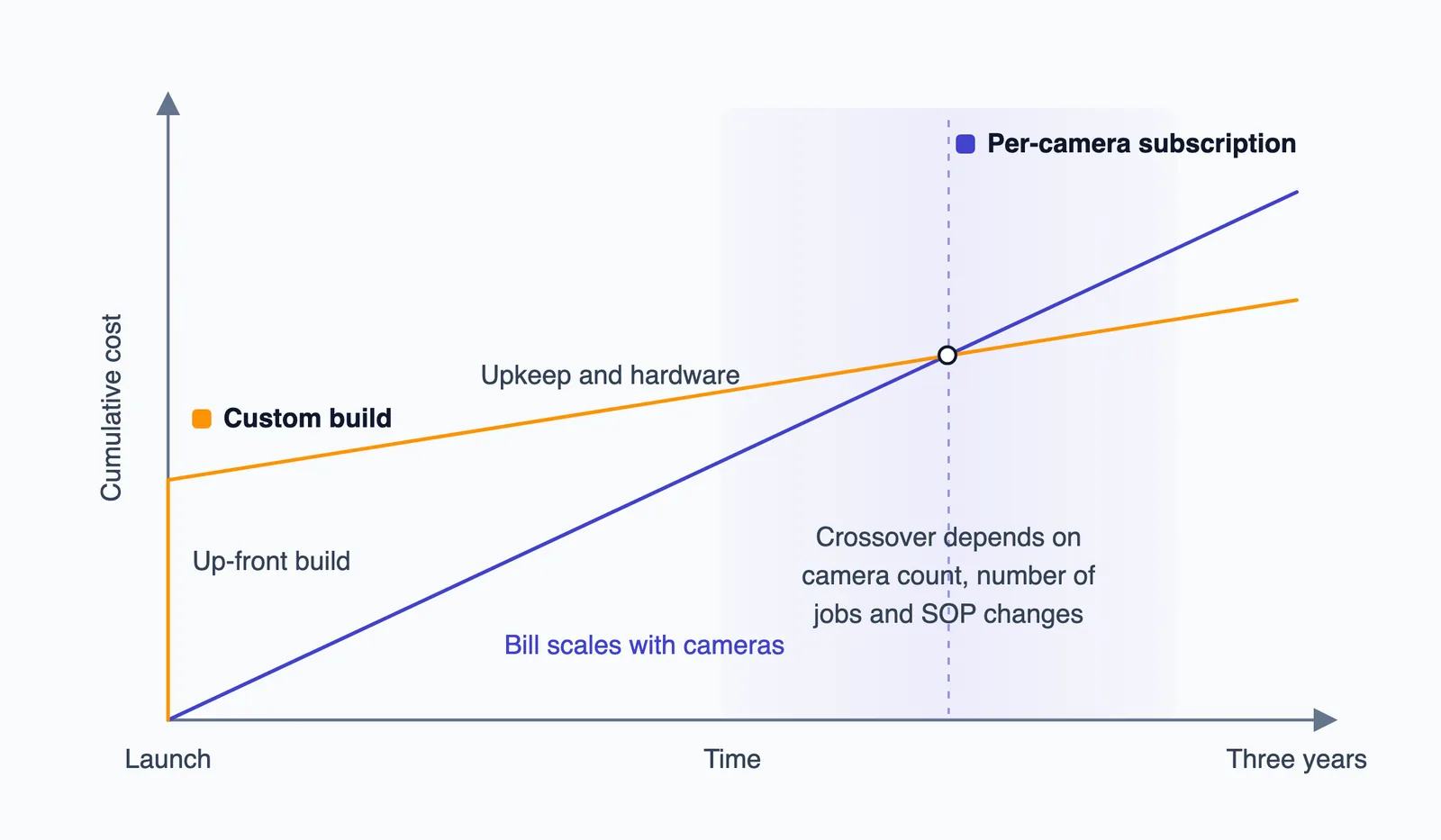
| Cost shape over 3 years | Grows in a straight line with cameras × months | A front-loaded build, then upkeep and hardware | "Quote 36 months on the same scope." |
| Support and changes | The vendor's roadmap and a ticket queue | A named engineering team | "What does a new rule or a new camera cost?" |
Two points about cameras. First, the Indian market leans towards local processing: on-premises held a 68.0% share of the Indian video analytics market by deployment type in 2025, according to IMARC Group. Second, ask every vendor whether it can read RTSP from your existing NVR and which ONVIF profiles it supports. ONVIF Profile M is the standard for analytics metadata and events such as object counting and plate recognition, delivered through the metadata stream, the event service or MQTT. Your fleet of CP Plus, Hikvision or Dahua units doesn't settle compatibility on its own. Confirm stream access on your own NVR.
The cost shape over three years
We won't give rupee estimates here, because the inputs differ too much from site to site. The shape of each option's costs is more useful.
Subscription and licence costs
A per-camera video analytics subscription follows a simple formula: cameras × monthly rate × 36. For reference only, Surveillant's US-market ranges as of July 2026 are $3–$15 per camera per month for an analytics add-on and $15–$42 for a cloud VMS subscription. A perpetual licence runs $115–$400 one time, plus annual maintenance of 15%–22% of the licence value (Surveillant). These are US vendor figures, not Indian quotes.
The point for a promoter is that the bill scales with the estate. Adding 40 cameras, or rolling out to a second plant in Jamnagar or Hosur, multiplies it.
Custom build costs
A custom build has a cost up front, then hardware (an edge box or an on-prem server), then upkeep. Fora Soft puts custom upkeep at about 15–20% of the build cost a year and notes that most lifetime cost falls after launch. What drives the build cost is the number of jobs, the number of distinct camera views, the labelling effort, the integration work and how often the model needs retraining. We break these down in the five drivers behind a custom AI build's price.
Don't trust a universal crossover point
Some articles claim a custom build "often becomes the cheaper option by month eighteen" but don't show their inputs. The real crossover depends on your camera count, how many jobs you need and how often your SOP changes. A 12-camera site with one standard job may never reach it. A multi-plant dispatch operation may reach it early. Ask both vendors for a 36-month quote on the same scope, and put the two side by side.
Data control, privacy and Indian rules
Where the video is processed decides who handles personal data. If footage goes to a vendor's cloud, the vendor handles it too, and your contract has to say how it is protected. If it stays on an on-prem server or an edge box, your own team carries more of that duty.
- DPDP. The DPDP Rules 2025 were notified on 13 November 2025. Consent manager provisions apply from 13 November 2026, and the substantive framework, including "reasonable security safeguards" and breach reporting, applies from 13 May 2027 (AZB & Partners). Ask each vendor how it handles encryption, access controls, logging and breach notice.
- Prefer face-free analytics. Counting, PPE, zone and queue jobs don't need identity. Choose systems that detect people and objects without recognising faces.
- New cameras. If a platform asks you to swap cameras, check that the new ones meet MeitY's Essential Requirements under the amended Compulsory Registration Order for CCTV, which was notified on 9 April 2024 and covers tamper resistance, encrypted transmission and penetration testing (S.S. Rana). S.O. 4378(E) moved the implementation date to 9 April 2025 (notification text), and MeitY upheld that date.
This is a summary, not legal advice. Check your own obligations with counsel.
When to choose each
Choose a platform when…
- The job is standard and appears on the menu.
- You want alerts running within weeks.
- Your cameras have clean, well-lit views.
- Cloud processing is acceptable to your IT and legal teams.
- You have no need to own the model, and no team to run ML systems.
For PPE and intrusion on clear views, a platform is often the right buy. Paying for a custom build of something the market already does well wastes money.
Choose custom computer vision when…
- The job follows your own SOP.
- The output has to post to your ERP or WMS, not just to a dashboard.
- The site needs on-prem or edge processing because of a weak uplink, power cuts or company policy.
- Your cameras are a mixed fleet with awkward angles.
- The licence bill would keep growing as you add cameras across several plants.
- You want to own the model and the labelled data.
Even a "standard" job can need custom work because of site conditions. In our PPE detection deployment for an industrial client in India, the system monitors 32 of the client's existing CCTV cameras across 4 facilities continuously, 24/7. It was configured using 45,000 real-world jobsite camera images, and the deployment took eight weeks, in four two-week phases. Unnoticed safety violations fell by 94% within eight weeks.
Run both when…
One RTSP stream can feed two systems. A platform can handle perimeter and intrusion alerts while a custom model handles dispatch counts from the same cameras. One example is a dock-side model that verifies shipment quantities against records, as in our loading and unloading monitoring system. Wevolver, citing Gartner, reports that most manufacturers favour a "buy-then-extend" strategy, which describes the same pattern.
How to test either option before you sign
- Send each vendor a clip of your worst-case footage: night shift, dust, monsoon rain, a crowded shift change.
- Agree one success metric and exactly how it will be measured, for example bag count error against the weighbridge record.
- Get ownership of the code, model weights and labelled data in writing.
- Ask what happens at exit: at renewal, at a price rise, or if the vendor shuts down.
- Get a 36-month quote on the same scope from each vendor.
- Confirm RTSP or ONVIF access from your existing NVR, on your own site.
- Confirm where processing happens and who holds the footage.
If custom wins for one or more jobs, here is how to choose a computer vision development company.
Settle it one job at a time
Make the decision for each job, not for the whole site. Buy a platform for the jobs the whole market shares. Build only where your process, your integration or your site conditions make the menu fall short. For a non-standard job, the cheapest way to decide is to measure it: run a paid 4-week PoC on one site with one agreed success metric. You get a measured result on your own cameras and a quote to scale up. If you go on to a full project, it includes 90 days of post-launch support and monitoring.
Frequently asked questions
Is custom computer vision more expensive than a video analytics subscription?
Custom costs more up front, because you pay for the build before anything runs. A subscription grows with every camera and every month. Which is cheaper over three years depends on camera count, number of jobs and how often your process changes, so compare 36-month quotes on the same scope rather than trusting a universal break-even point.
Can video analytics software work with my existing CCTV cameras and NVR?
Usually yes, if the NVR exposes RTSP or ONVIF streams. Camera position, resolution and night IR quality matter more than the brand. Ask the vendor to run a test on a clip of your own footage before you sign anything.
Who owns the AI model in a custom computer vision project?
It depends on the contract. Ask for the code, model weights and labelled training data to be handed over, in writing. With a platform you normally license the vendor's model and keep only your outputs.
How long does it take to go live with a video analytics platform vs a custom model?
For jobs on its menu, a platform can go live in days to weeks. At AtlasML, a custom proof of concept can be ready in 4 weeks, and most projects run 8 to 16 weeks from kickoff to production.
Can I use a platform for PPE and a custom model for dispatch counting on the same site?
Yes. Both systems can read the same RTSP streams from your NVR. A platform for the standard alerts plus a custom model for the jobs that follow your own SOP is often the cheapest setup.
Does AI video analytics have to run in the cloud?
No. It can run on the camera, on an edge box, on an on-prem server or in the cloud. On-premises held 68.0% of the Indian market by deployment type in 2025. Under the DPDP framework, where footage is processed affects who handles personal data and must protect it. This is not legal advice.