
You have quotes from three vendors. One sells an infrared beam, one an overhead 3D sensor, and one AI that runs on your CCTV. Each says its retail people counter is 95 to 99 percent accurate or better, and none of the brochures says under what conditions. That's normal. Ariadne, a sensor vendor itself, notes that vendor accuracy figures usually fall "somewhere between 95 and 99 percent" and that most vendors don't publish the test conditions behind them.
The comparison pages you'll find online don't help much. Nearly all of them are written by a company selling one technology, and each one ends up recommending its own sensor. This guide takes a different route. It starts from your entrance (door width, ceiling height, traffic, light and privacy needs) and matches those to the technology that physically suits them. Then it gives you a protocol to test any vendor's number on your own doorway before you sign. If you're still deciding what footfall data is useful for, start with our guide to retail people counting and footfall analytics. This article assumes you've already decided to count and need to pick the hardware.
A disclosure: AtlasML builds CCTV-based counting. That's why this guide says plainly where camera AI is the wrong buy, and there are several such cases.
The three main options, and how each one counts
Infrared beam counters
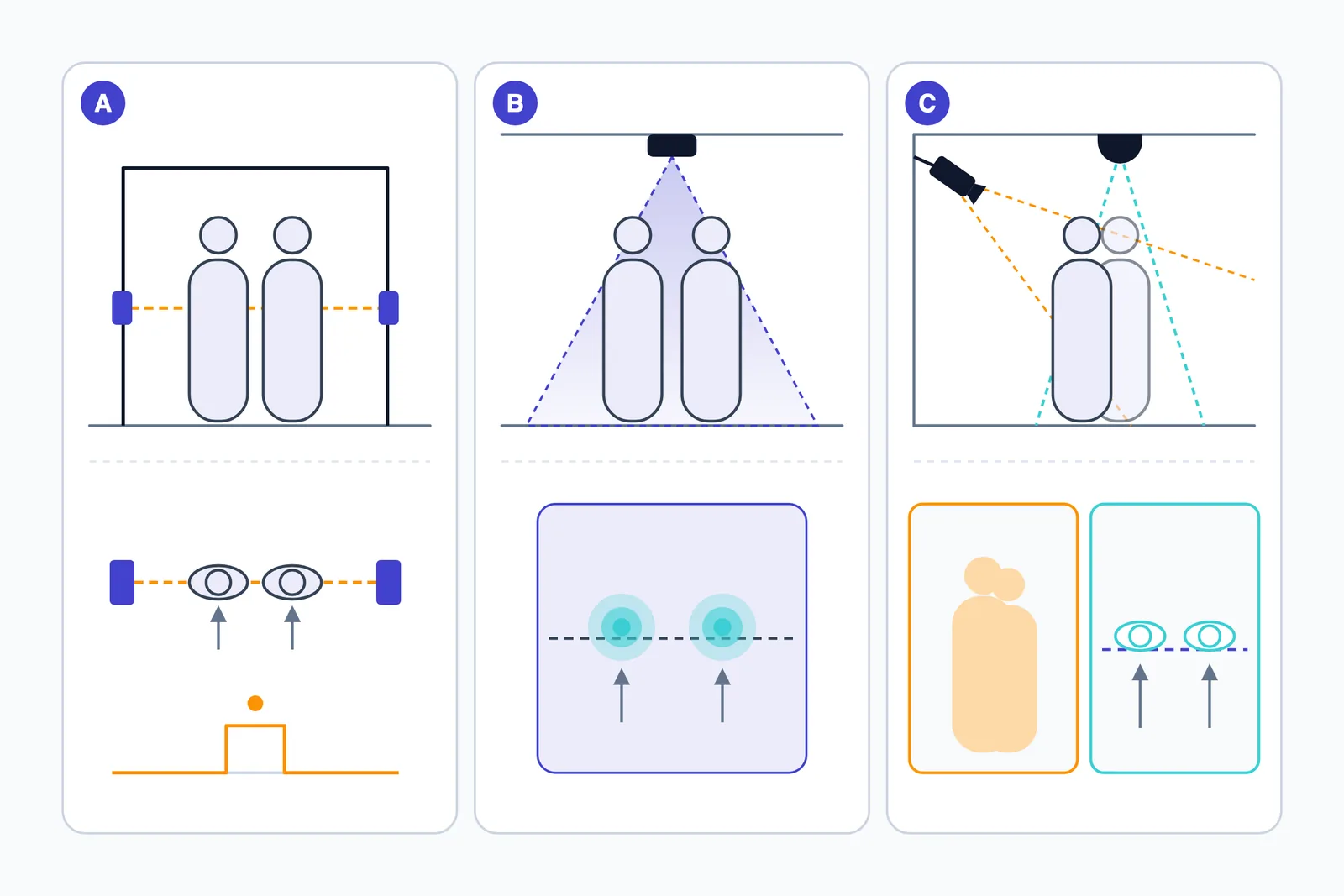
An infrared beam counter has a transmitter on one side of the doorframe and a receiver or reflector on the other. Each time something breaks the beam, the count goes up by one. Some units use two beams a short distance apart and read direction from which beam breaks first.
The limit comes from how it works. The counter knows the beam was interrupted, but not how many people interrupted it. Two shoppers walking side by side break it once. In Ariadne's words, "a family of four walking in together collapses into a single count." Someone pacing in the doorway can break it several times. SenSource, which sells stereo sensors, calls break-beam obsolete for these reasons. That's a competitor's opinion, but the mechanism behind it is real.
IR does get some things right. It's simple, it captures no images and it doesn't care about ceiling height. On a narrow door where people come in one at a time, it can do the job.
3D stereo and time-of-flight (ToF) sensors
These sensors mount on the ceiling, point straight down at the entrance and measure depth instead of recording a flat picture. Stereo sensors compare the views from two lenses to work out distance, the way your two eyes do. Time-of-flight sensors send out their own infrared light and time how long it takes to bounce back. Milesight's VS133/VS135, for example, uses a 940 nm ToF beam.
Because they see height and shape, depth sensors can do several things a beam can't:
- separate two heads moving side by side
- track each person across a counting line in either direction
- filter by height so children can be treated differently
- ignore carts and bags that don't look like a person from above
Their main constraint is geometry. The area one sensor can cover depends on how high it's mounted, so wide doors need several units.
Two other camera-free options belong in the same group. Radar sensors detect movement with radio waves and produce no image, which is why radar vendors lead with privacy. Thermal sensors pick up body heat from overhead. They're an older option, and SenSource says thermal "typically achieves around 85% accuracy" and is affected by HVAC airflow and by people standing still. Treat both as vendor claims to test, like every other number in this guide.
CCTV-based AI counting
Here a detection and tracking model runs on a video feed. It finds each person in every frame and follows them from frame to frame. When a track crosses a virtual line drawn across the entrance, it counts as IN in one direction and OUT in the other. The model can run on an existing camera or on a new one installed overhead, and it can run on an edge box in the store or on a server.
Of the three options, it's the only one that also gives zone occupancy, dwell time and queue length from the same hardware. It's also the only one that leaves recorded video you can re-audit later. The trade-off is that it processes images of people. Privacy design (where processing happens, what leaves the store, how long anything is kept) is part of the build, not something to add later. Accuracy also depends heavily on where the camera sits. A camera looking straight down sees separate heads. A security camera angled across the door sees people overlapping each other.
Retail people counter decision table: match the technology to your entrance
The physical limits of each technology are usually in installation manuals, not on sales pages. These are the published numbers worth knowing:
- Axis P8815-2 3D People Counter: mounts between 250 and 600 cm. Maximum counting width is about 199 cm at a 250 cm mounting height and 306 cm at 300 cm, capped at 400 cm from 350 cm upward. Wider areas need several linked devices at the same height, each mounted straight above the passage.
- AXIS People Counter (a 2D camera app): recommended minimum mounting height is 270 cm, with the camera straight above where people pass. In Axis's words, "the camera covers an area as wide as the camera's mounting height", up to 8 m of coverage width at sufficient height.
- Milesight VS133/VS135 (ToF): the standard version mounts at up to 3.5 m and the high-ceiling version at up to 6.5 m.
All three follow the same rule: coverage width grows with mounting height. A wide door under a low ceiling is the hardest combination for any overhead device.
| Your entrance | IR beam | 3D/ToF (or radar) | CCTV AI |
|---|---|---|---|
| Narrow single door, about 1 m | Good fit if traffic is single-file | Works, often more than you need | Works with an overhead camera |
| Double door, about 2–3 m | Undercounts people entering side by side | Good fit. Check counting width at your mounting height (Axis 3D: 199 cm at 250 cm, 306 cm at 300 cm) | Good fit overhead. Width roughly equals mounting height |
| Wide or open shopfront, 4 m or more | Wrong tool | Several linked sensors at the same height (one Axis 3D unit caps at 400 cm) | One high-mounted camera (up to 8 m on the Axis 2D app) or several cameras |
| Low ceiling, under about 2.5 m | Unaffected | Narrow coverage. Axis 3D minimum is 250 cm | Narrow coverage. Axis 2D app recommends at least 270 cm |
| High mall ceiling | Unaffected, but only covers the doorframe | Needs a high-ceiling variant (Milesight up to 6.5 m, Axis 3D up to 600 cm) | Workable. Check people are still large enough in the frame |
| Dense or group-heavy peaks | Weak: one break is one count | Strongest: height and shape separate bodies | Good overhead, poor from angled cameras |
| Strong sun or glare at a glass or street front | Doesn't build an image, so scene lighting matters less | Active ToF and radar bring their own signal. Ask for sunlight tolerance | Weakest case. Axis advises keeping strong sunlight and sharp shadows out of view |
| Low light | Unaffected | Active sensing, less dependent on ambient light | Depends on the camera's low-light performance |
| Privacy-sensitive store (pharmacy, clinic, children's store) | No images | No identifiable images by default. Check for any video validation feature | Needs privacy design: edge processing, counts-only output, notices |
| Need zones, dwell or queues | No | Built mainly for counting at the door. Check vendor features | Yes, from the same system |
| Overhead camera already at the door | n/a | n/a | Strong case for reuse |
| Only angled security cameras | n/a | n/a | Usually needs one added overhead camera per entrance |
| Multi-site benchmarking | Comparable only if doors are similar | Good: same unit, same mounting standard | Only with standardised overhead placement |
Some ways to read the table:
If your entrance is a 4 m open shutter, a beam is the wrong tool whatever it costs. Either link several overhead depth sensors at the same height or mount a camera high enough to cover the width. By Axis's rule of thumb, one 2D camera over a 4 m opening needs about 4 m of mounting height.
If you have a single 1 m door and people come in one at a time, an IR beam may be all you need. Paying for 3D sensing there buys you little.
If your door is glass, faces the street and gets afternoon sun, lighting is your biggest risk. Prefer active ToF or radar at the door, or test a camera during the worst afternoon hour before you commit.
If you need dwell and queue data as well as door counts and you have, or can add, an overhead camera at the entrance, camera AI gives you both from one system. Most of the work then goes into placement and validation, which is what a computer vision development engagement should cover. Whatever you choose, footfall is one input to retail AI work such as demand forecasting and staffing, so pick a device whose raw data you can export.
How counts go wrong, and what each technology does about it
Vendors describe accuracy as a single number. In practice it's the sum of several specific failures, each with its own cause. Knowing them tells you what to watch for during a test.
Groups and side-by-side entries
This is the biggest single source of error at busy entrances. A beam counts a group as one person. Ariadne's group-entry article works through illustrative numbers. They are examples, not measurements: about a 9% undercount if 10% of entries are pairs, 20% if 25% are pairs, and 33% if 20% of entries are groups averaging 3.5 people.
Cameras have their own version of the problem. When people overlap in an angled view, a detector that relies on separate regions sees one shape. Ariadne describes occlusion that "fuses them into a single region and the count is one." Mounting overhead reduces this because heads rarely overlap when seen from directly above. Overhead depth sensors separate groups best, since they can also use height to split people standing close together.
Children, strollers and carts
Height filtering is a policy choice, not an accuracy fix. A depth sensor can be set to ignore anyone under a set height, and Milesight lists child/adult differentiation as a feature. Axis's 2D app is designed to count objects with the characteristics of an adult person. You decide whether a toddler in a stroller or a child on a parent's hip counts, and your manual audit has to use the same rule. Irisys's audit guidance, published by Fluke, tells auditors to count everyone rather than splitting adults from children, and to agree in advance how carried children are treated.
Depth sensors and camera models can be configured or trained to ignore carts and prams. A beam counts anything that breaks it.
Staff, security guards and delivery people
Staff go through the door many times a day. Without staff exclusion, a store whose guard steps in and out every few minutes will over-count. There are three options:
- Camera AI can be trained to recognise a uniform.
- Some sensors pair with a tag, such as Milesight's optional VA31 Staff Lanyard.
- An IR beam can't exclude anyone.
If staff exclusion isn't configured, Irisys's guidance is to include staff in the manual count so the comparison is fair. This matters more in India than in most markets, because a guard at the door is common and often stands right in the counting zone.
Shadows, sunlight and glare
This is the strongest argument against camera counting. For its 2D app, Axis tells installers to "avoid getting very strong light, like sunlight, and sharp shadows in the camera view". For its 3D counter, it says to keep the counting area away from walls so wall shadows aren't counted. A long shadow crossing the line can look like a person, and glare on a glass door can wash out the person behind it. Active ToF and radar bring their own signal, so they depend less on ambient light, though you should still ask about sunlight tolerance for a street-facing door. A beam doesn't build an image of the scene at all.
Loitering, doors and moving objects
Any counter that tracks movement in a zone can be confused by things that move there without entering. Axis lists loitering people and swaying objects as interference for its 3D counter, and nearby doors and escalators for its 2D app. A door that swings into the counting area, a promotional standee swaying under a fan, or a group chatting on the threshold all add noise. SenSource says thermal sensors struggle with people standing still. U-turn filtering, which Milesight lists, handles the shopper who walks in, sees the queue and walks straight out.
Daily totals that hide errors
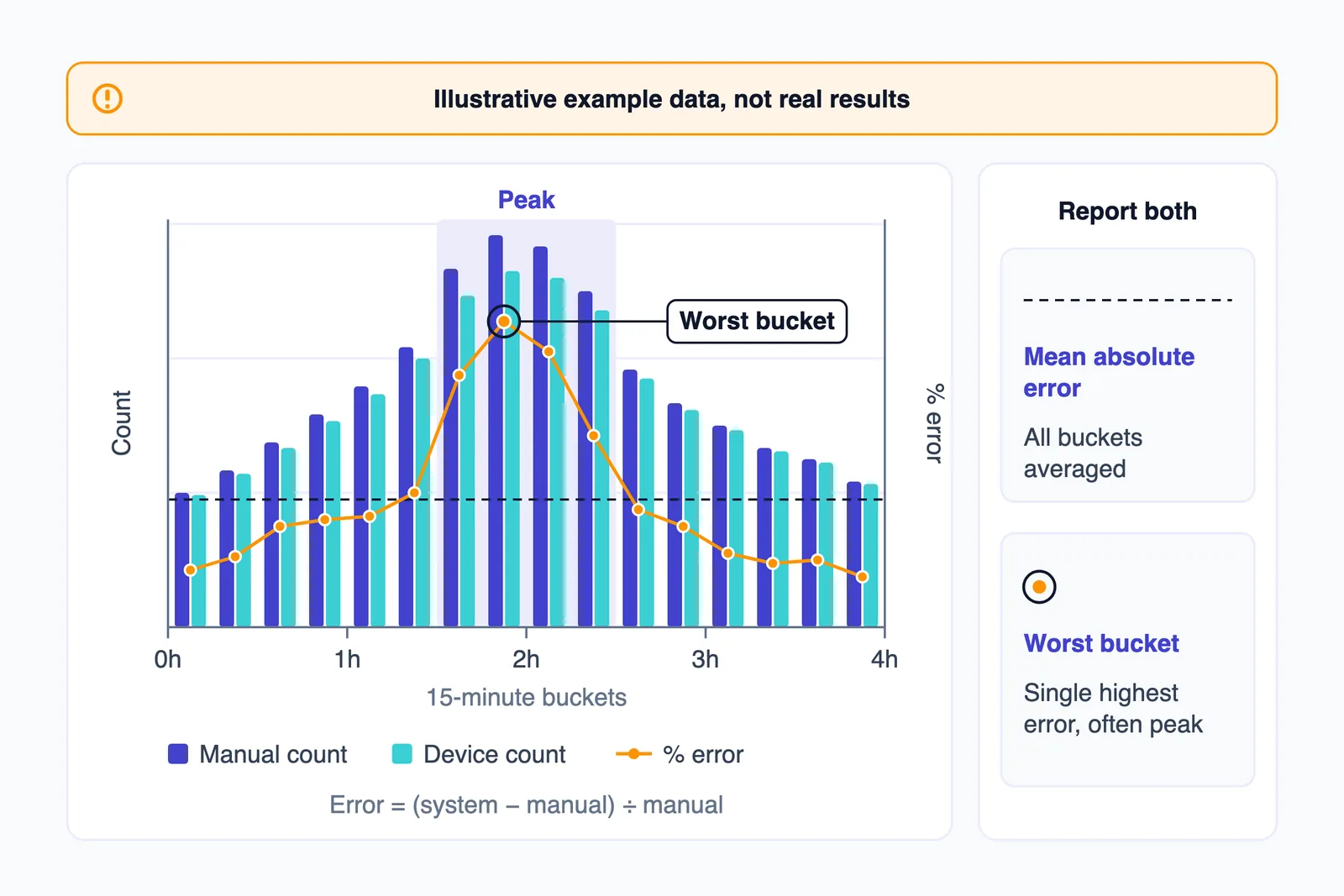
Over-counts and under-counts cancel each other out. Picture a sensor that double-counts staff in the morning and merges groups at lunch. Its daily total could land close to the truth while every hour that matters for staffing is badly wrong. That's why the test below uses 15-minute buckets and absolute error instead of one daily comparison. It matters later too. Counts only become useful once they're joined to POS and staffing data in a retail analytics pipeline, and conversion rate by hour is only as good as the hourly count behind it.
How to test a vendor's accuracy claim on your own doorway
This protocol combines Ariadne's published method with Irisys's audit guidance. Run it during a trial, before you sign up for a chain-wide rollout.
- Pick your hardest entrance. Choose the busiest door, the widest opening and the worst light. A system that passes there should pass elsewhere.
- Agree the counting rules in writing. Count everyone. Decide whether carried children count. Include staff unless exclusion is configured and switched on. Count IN and OUT separately for each door.
- Use two independent observers, or record video and count it afterwards. Irisys is blunt about this: it should "never be assumed that a manual count carried out by a lone observer is accurate." Where the two counts disagree, check the footage.
- Cover enough time and people. Irisys sets a minimum of one hour and 100 people. Ariadne recommends a four-hour window that spans quiet and peak periods, split into 15-minute buckets. A 20-minute test captures only one density and one lighting condition.
- Export the device's counts for the same door and the same buckets. Sync the clocks first, or the bucket boundaries won't line up.
- Calculate the error for each bucket as (system − manual) ÷ manual. Report the mean absolute error and the worst bucket, not one headline figure. Irisys uses the opposite sign, (manual − system) ÷ manual, so in its example 1,000 manual against 993 system is a 0.7% undercount. Agree on one convention with the vendor.
- Tag each bucket with density, group mix and lighting, for example "peak, families, low sun". The pattern of failures tells you more than the average does.
- Never test by comparing the system's IN count with its own OUT count. Irisys warns against this. A counter that misses the same share in both directions will balance perfectly and still be wrong.
- Repeat the test after any firmware update or change to the layout, entrance or lighting.
Reading Milesight's "up to 99.8%"
Here's a real example. Milesight's VS133/VS135 product page leads with "99.8% Accurate People Insights, GDPR First". Elsewhere on the page, the same figure appears as a recognition rate of "up to 99.8%". "Up to" means the best case. The product page states no test conditions. It links to an accuracy test report PDF, and that report is the document to read and question.
That isn't unusual, and it isn't necessarily misleading. Every vendor's best-case number came from some door on some day. The problem is that you can't tell whether that door looks like yours. Ask the vendor:
- What were the door width and mounting height during the test?
- What were the traffic density and group mix?
- What was the lighting: indoor, glass front or direct sun?
- What were the sample size and duration, and how was the manual count done?
- Which firmware version was tested?
- Is the figure an average per bucket, a daily total or the best result?
The spread matters more than the headline. Ariadne gives a hypothetical department-store example in which one counter scores 99% on a quiet morning, 96% in the late morning, 88% at the lunch peak and 95% in the afternoon. The mean is about 94%, but the range is 88–99%, and the 88% bucket falls exactly when you'd be deciding how many tills to open. The same article contrasts a 1-metre single-file doorway with a 4-metre mall entrance. One device can produce very different numbers at each.
Is CCTV-based counting a mistake? Answering the 2026 case against it
On 4 May 2026, SensMax, a radar and infrared sensor vendor, published an article arguing that retailers are moving away from CCTV people counting. It deserves a fair hearing, especially since we build camera-based counting and have an obvious interest in the answer.
Where the argument holds
- Lighting. SensMax writes that "Sunlight, shadows, glass reflections and changing lighting conditions reduce CCTV counting accuracy." Axis's own installation guidance agrees.
- Groups. "Groups, families and high traffic overlap create miscounts." This is true of angled cameras, as described above.
- Consistency. "Different camera angles and heights make chain-wide benchmarking unreliable." If each store's counting camera was placed for security, you're comparing different measurement setups, not different stores.
- Privacy. CCTV "still capture[s] identifiable video data". Counting with cameras adds a governance burden that a radar unit doesn't.
- Scale. Processing video and moving it around costs compute and bandwidth, and that adds up across many stores.
Where it doesn't
- It publishes no accuracy figures, either for CCTV or for its own sensors. Its companion piece on accuracy says results depend on "technology + environment, not brochure numbers". That's correct, and it applies to radar too.
- It admits that retailers are "not replacing CCTV entirely" and recommends a hybrid model.
- Most of its points are about angled security cameras repurposed for counting. An overhead camera installed for counting, at the same height and angle in every store, removes the placement and benchmarking problems and most of the occlusion problem.
- Processing on an edge device in the store and sending out only counts reduces how much video leaves the premises. That doesn't remove the privacy obligation, but it changes the risk.
- Camera AI does things radar doesn't: staff exclusion by uniform without tags, zone and dwell data from the same device, and recorded video you can re-audit when a number looks wrong.
When radar or ToF really is the better choice
Buy a dedicated camera-free sensor when any of these apply:
- There's nowhere to put an overhead camera at the entrance, and an angled view is all you can get.
- Privacy requirements are strict: a pharmacy, a clinic, a children's store, or a landlord or legal team that won't accept cameras used for analytics.
- The entrance has strong backlight or poor light that you can't fix.
- You're rolling out to many sites and need identical, comparable installs with as little per-site setup as possible.
- You only need counts. If nobody will use dwell or zone data, paying for a vision pipeline to get it makes little sense.
Our view is that camera AI earns its place when you'll actually use the extra data and can mount a camera properly. If either condition fails, buy a sensor.
Reusing existing CCTV: what decides whether it works
"Use your existing cameras" is the most common pitch and the most common disappointment. Whether it works comes down to a few checks you can do on site:
- Camera angle. Counting works best with a camera looking straight down, or steeply down, at the door, so heads stay separate. Security cameras are usually angled to capture faces, which is the opposite of what counting needs.
- Mounting height compared with door width. By Axis's rule of thumb that coverage width roughly equals mounting height, an overhead camera at 3 m covers an opening about 3 m wide. A 6 m shopfront needs a higher mount or two cameras.
- Resolution and frame rate at the doorway. People need to be large enough in the frame to detect, and the frame rate needs to be high enough that a fast walker isn't missed between frames. A wide-angle camera covering the whole shop floor may give each person at the door only a few pixels.
- Stream access. The NVR or DVR has to expose a usable stream, usually RTSP, at a resolution the model can work with. Some older recorders offer only low-resolution sub-streams or proprietary formats.
- Where the computing happens. An edge box in the store keeps video local and copes with a weak uplink. A central server is easier to manage but needs bandwidth from every store.
In practice the usual answer is a hybrid. Add one overhead camera per entrance running the counting model, and use the existing angled cameras for zone and dwell analytics on the shop floor, where occlusion matters less. You get the same counting setup in every store while still reusing what's already installed.
We designed our footfall analytics system this way. It runs on compatible CCTV and IP cameras and covers entry and exit counting with virtual lines, zone occupancy, and hourly, daily and weekly reports, with an estimated 8–10 week build. The case study describes the expected benefits of the proposed design, not measured deployment results. Counting accuracy is listed as something to validate on site, using the kind of test described above.
See It Working: A Retail People Counter on Existing CCTV
This demo shows AI people counting on a retail store's existing surveillance camera, with no sensors at the door and no new hardware. On an unedited storefront feed, each person gets a bounding box and a confidence score and is tracked from frame to frame. They're counted when they cross the entry line, and the IN and OUT counters update live. Watching the counts happen on raw footage is how you should judge any CCTV-based counter before you buy.
Want to see how this counts on your own store entrance? Call +91 95372 90206 or message us on WhatsApp and we'll walk you through it.
Setting up a people counter in Indian stores
None of the vendor material we reviewed deals with Indian store formats. Based on how each technology works, these are the conditions to plan for:
- Open shutter fronts and very wide entrances. A rolling shutter that opens the whole front leaves no doorframe for a beam and no narrow passage for a single overhead sensor. Plan for several linked overhead sensors at the same height, or one camera mounted high enough to cover the width. If the space narrows into aisles a little way inside the shop, a counting line there may be cleaner.
- Street-facing glass and harsh afternoon sun. Low sun through a glass front casts long shadows and glare across the threshold for part of the day. Test during that hour specifically. With cameras, move the counting line inside the shade line if you can.
- Footpath passers-by. With an open front, people on the footpath clip the edge of the counting zone. Put the line far enough inside that only shoppers who are entering cross it, and use direction logic so someone walking past isn't counted.
- Guards and staff at the door. Decide on exclusion before the test: uniform recognition, a lanyard tag, or including staff in the audit. Ask the guard not to stand on the counting line.
- Families and festive peaks. Group shopping during festival seasons is exactly when beams undercount and angled cameras merge people. Run your test on a busy weekend evening, not a quiet weekday morning.
- Low ceilings and double-height malls. Older high-street buildings often have low ceilings, which narrow overhead coverage. The Axis 3D counter needs at least 250 cm and its 2D app recommends at least 270 cm. Mall stores with double-height fronts may need a high-ceiling variant, such as Milesight's 6.5 m version.
- Power interruptions. Check that the device or edge box stores counts locally during an outage and uploads them afterwards. Check that its clock is still correct when power comes back. Axis notes that setups with several devices need synchronised time, ideally via NTP. A counter that reboots with the wrong time puts counts in the wrong buckets.
- Network uplink. Small-format stores often run on a single broadband connection. Sensors that send only counts need very little bandwidth. Streaming video to a central server needs far more. Processing on an edge device suits weak connections.
- Privacy and the DPDP Rules. India's DPDP Rules were notified on 13 November 2025. Rule 4, on consent managers, applies from 13 November 2026. Rule 3, on notice, applies from 13 May 2027, along with the substantive obligations. If your counting system processes images of identifiable people, plan for a clear notice at the entrance that says cameras are in use, what they're used for and who to contact. Keep retention short. Take legal advice on your specific setup. Camera-free sensors cut down the personal data you collect in the first place.
The camera-audit approach we describe for PPE detection on CCTV in Indian plants works at a shop door too. Check the angle, height, light and uplink before you trust any model.
A short buying checklist
Send these questions to every vendor on your shortlist and compare the answers side by side:
- What were the test conditions behind your accuracy claim: door width, mounting height, traffic density, group mix, lighting and sample size?
- Which firmware version was tested, and how are updates rolled out?
- How do you handle two-way traffic, when people enter and leave at the same time?
- How do you separate groups and people entering side by side?
- How are staff excluded: uniform recognition, tags, or not at all?
- Are images ever stored or transmitted? Milesight's spec, for instance, lists one channel of "video validation" lasting 4 hours. That's useful for audits, but you should know it's there.
- What happens during a network or power outage? Are counts stored locally, and for how long?
- Can we export raw counts per interval, by API or file, without a dashboard subscription?
- Will you audit accuracy at installation, and can we run our own audits afterwards?
Get the last point in writing. RetailNext, for example, advertises "95–99% accurate people counting, manually audited at every installation" and offers HD video for independent validation for up to 30 days. Whatever a vendor's accuracy figure is, a commitment to audit at installation and to let you check the result is worth more than the figure. If you're comparing custom builders rather than boxed sensors, see how to choose a computer vision development company.
Frequently asked questions
How accurate are retail people counters?
Vendors typically claim 95–99% or better, but those figures rarely come with test conditions. Real accuracy depends on door width, traffic density, group mix and lighting, and it can swing widely across a single day. The only reliable figure is one you measure on your own doorway, in 15-minute buckets, covering quiet and peak periods.
Which is better for a store entrance: infrared, a 3D sensor or a camera?
Infrared suits narrow doors where people enter one at a time and the budget is tight. Overhead 3D or time-of-flight sensors suit busy, group-heavy or wider entrances. CCTV AI suits stores that also want zone, dwell and queue data and have, or can add, an overhead camera at the entrance.
Can I use my existing CCTV cameras to count customers?
Only if a camera views the doorway from directly or steeply overhead, mounted high enough to cover the opening. Angled security cameras make people block each other, which causes undercounts in groups. Adding one overhead camera per entrance and using the existing cameras for in-store analytics is a common compromise.
How do I check a people counter's accuracy?
Have two observers count independently, or record video and count it later. Cover at least one hour and 100 people, and ideally four hours across quiet and peak times. Compare against the device in 15-minute buckets, calculate the error for each bucket, and report both the mean absolute error and the worst bucket.
Do people counters count staff and children?
By default, most count everyone who passes. Excluding staff needs uniform recognition on a camera system or tags such as lanyards on a sensor system. Children can be filtered out by height on depth sensors. Decide your rules before testing and apply the same rules to the manual count.
Is camera-based people counting allowed under India's DPDP law?
India's DPDP Rules were notified on 13 November 2025, with notice obligations applying from 13 May 2027. If cameras process images of identifiable people, plan for clear notices and short retention, and take legal advice on your setup. Camera-free sensors such as radar or ToF reduce the personal data you collect.